
You just pulled a mile of fiber optic cable from a street splitter to a customer’s house. Now what? You can’t plug a raw glass strand into a Wi-Fi router. Standard IT hardware only understands electrical signals.
You need a media converter at the absolute edge of the network. That is what an ONT (Optical Network Terminal) does.
If you are buying FTTH hardware or troubleshooting a dead connection, forget the marketing brochures. Here is the physical reality of how ONTs work, the difference between bridge and gateway units, and what exactly happens inside that plastic box on the wall.
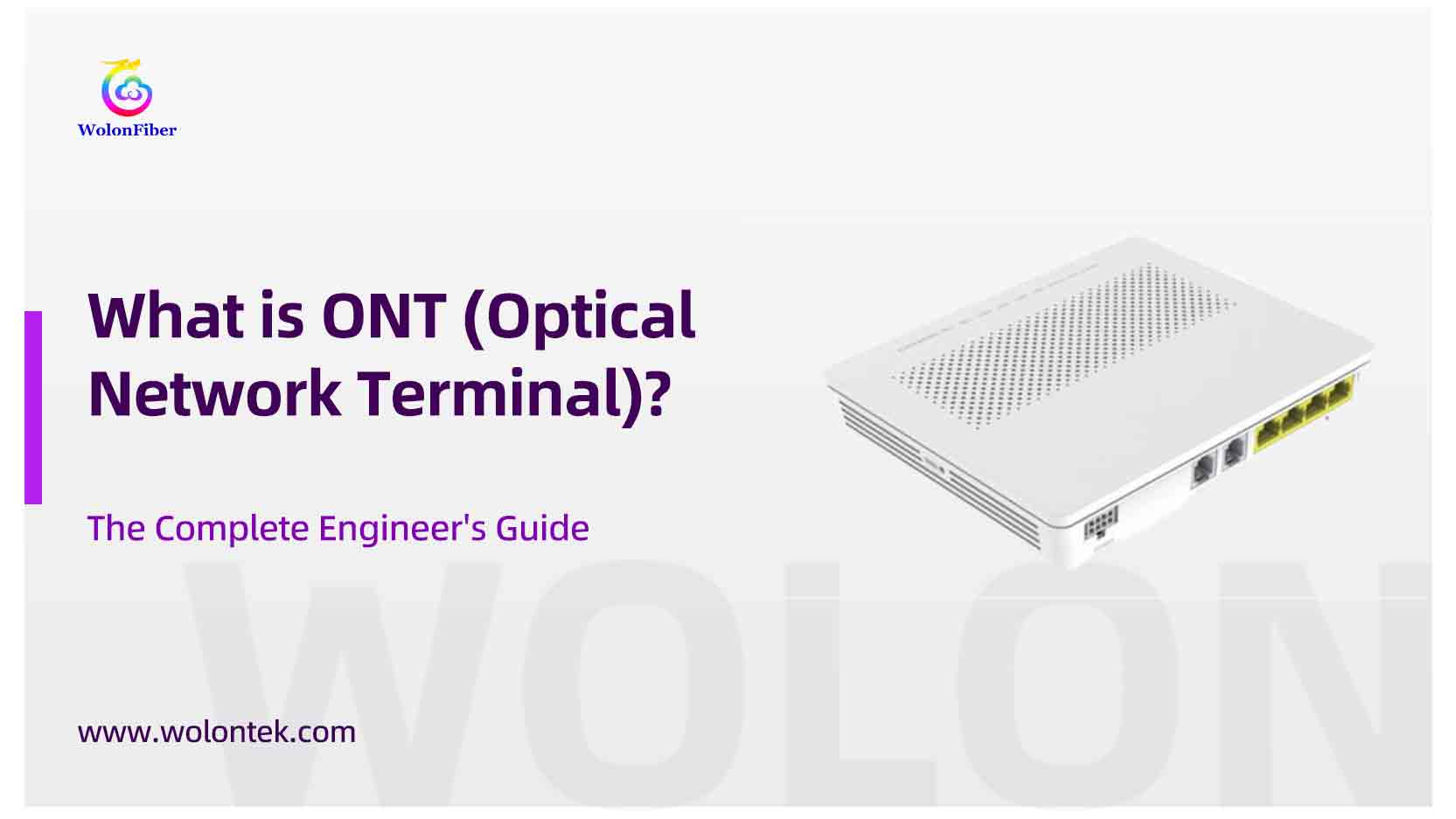
What is ONT? (The “Fiber Modem”)
People call the ONT a “magic box” or a “fiber modem.” It isn’t magic, and it technically isn’t a modem (modems handle analog frequency over copper, not digital light over glass).
An ONT is a strict photoelectric translator.
When the ISP’s central OLT (Optical Line Terminal) transmits data, it fires 1490nm light pulses down the fiber. The ONT catches those photons using a BOSA (Bidirectional Optical Sub-Assembly), demodulates the light, and converts it into standard electrical Ethernet frames. When you upload a file, the ONT uses its own internal laser to fire 1310nm light pulses back up the same fiber.
That’s it. It’s the dead-end of a Passive Optical Network (PON). (Note: Some vendors print “ONU” on the box. Functionally, in an FTTH setup, an ONU and an ONT are the exact same thing).
How Does an ONT Work?
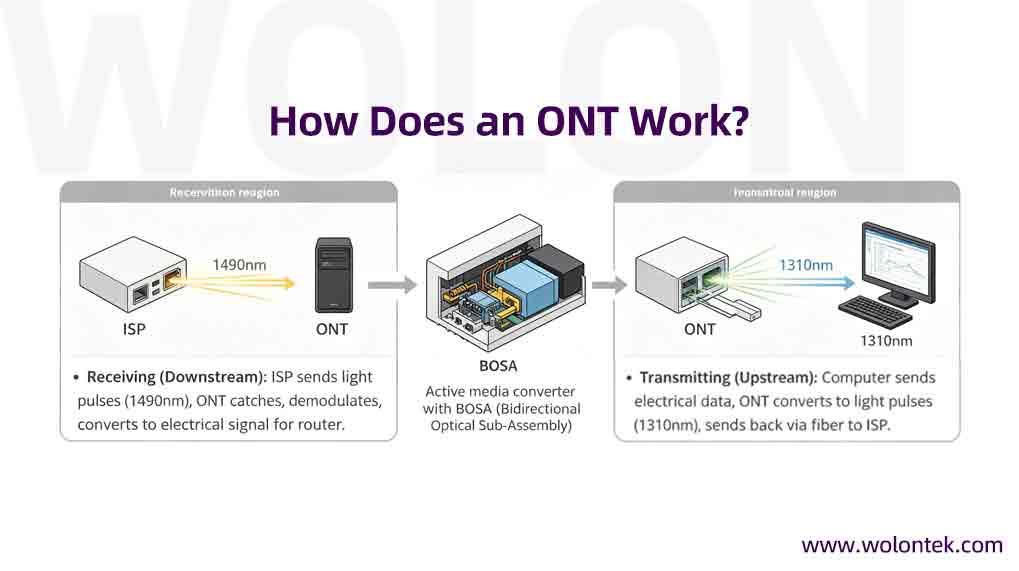
An ONT is not a passive passthrough box; it is an active media converter that performs photoelectric conversion. Inside the chassis is a highly sensitive optical transceiver (typically a BOSA – Bidirectional Optical Sub-Assembly).
-
Receiving (Downstream): When the ISP sends data to your house, it travels as pulses of light (typically at a 1490nm wavelength). The ONT catches this light, demodulates it, and converts it into an electrical signal that your router can understand.
-
Transmitting (Upstream): When you upload a file, the ONT takes the electrical data from your computer, uses its internal laser to convert it into light pulses (typically at 1310nm), and shoots it back up the fiber optic cable to the ISP’s central equipment.
Components of an ONT Device
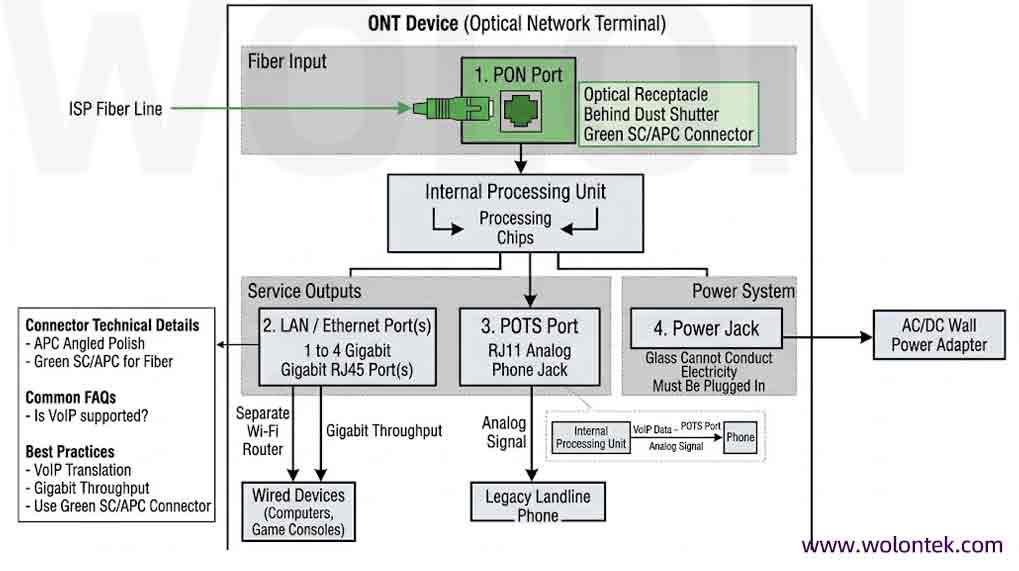
If you inspect a modern enterprise or residential ONT, you will find a highly standardized set of physical hardware ports:
-
PON Port: The optical receptacle (usually hidden behind a dust shutter) where the ISP’s fiber line enters. This almost universally utilizes a green SC/APC (Angled Physical Contact) connector.
-
LAN / Ethernet Ports: Typically 1 to 4 Gigabit RJ45 ports. This is where the electrical internet signal leaves the ONT to feed your wired devices or separate Wi-Fi router.
-
POTS Port (RJ11): An analog telephone jack. The ONT translates Voice over IP (VoIP) data, allowing users to plug in legacy landline phones over a fiber connection.
-
Power Jack: Fiber optic glass cannot conduct electricity. The ONT must be plugged into a standard AC/DC wall outlet to power its internal processing chips.
The “ONT Cable” Explained
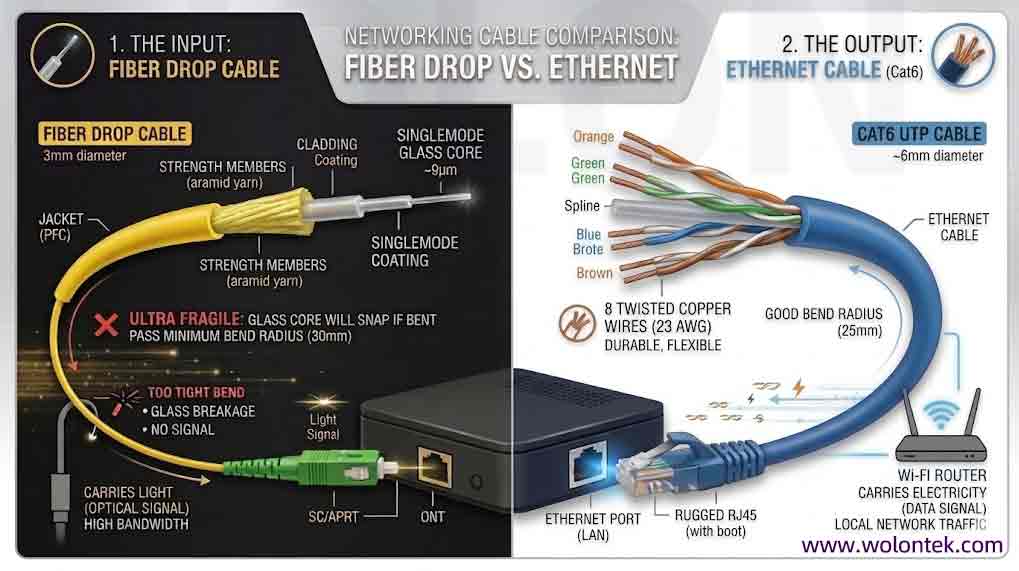
One of the most frequently searched terms by field technicians is “ONT cable.” From a strict engineering perspective, there is no single cable officially called an “ONT cable.” Instead, an ONT box relies on two completely different physical cables to function:
1. The Fiber Drop Cable (The Input): This is the delicate fiber optic line coming from the outside street splitter through the wall of the house. It plugs directly into the optical port on the ONT. In 99% of global FTTH deployments, this cable is terminated with a green Sc/Apc connector. It carries the raw, high-speed light signal.
2. The Ethernet Cable (The Output): Once the ONT translates the light into electricity, it pushes the data out through standard RJ45 ports. You use a standard copper Cat5e or Cat6 Ethernet cable to connect the ONT to your home Wi-Fi router.
ONT Cable vs Ethernet Cables: Key Differences Between Them
One of the most frequently searched terms by new technicians is “ONT cable.” This is a confusing term because the ONT sits precisely at the boundary of two completely different physical cabling mediums:
1.The Input (Fiber Drop Cable): This is the fragile glass strand coming from the street. It plugs into the PON port. It carries light. If you bend this cable past its minimum radius, the glass core will snap.
2.The Output (Ethernet Cable): This is the copper Cat5e or Cat6 RJ45 patch cable connecting the ONT to your Wi-Fi router. It carries electricity, is highly durable, and handles the local network traffic.
ONT vs Modem: What Are The Key Differences?
Because the ONT replaces old cable and DSL modems, consumers naturally call it an “ONT modem.” However, network engineers know they are fundamentally different technologies.
A Modem (Modulator-Demodulator) operates on copper infrastructure (coaxial or twisted-pair). It translates analog frequency waves into digital signals.
An ONT operates on pure glass fiber. It performs digital photoelectric conversion (light to electricity). It does not modulate analog frequencies.
Why Are ONTs Important?
The ONT is the ultimate bottleneck of a fiber network. An ISP can deploy a massive 10G-PON or XGS-PON infrastructure, but if the end-user has a cheap, overheating, or outdated ONT, they will never experience gigabit speeds.
Furthermore, the ONT handles critical network security. It registers its unique Serial Number (SN) or MAC address with the ISP’s Optical Line Terminal (OLT), ensuring that only authorized users can access the bandwidth.
Types of ONT Devices
ISPs deploy different flavors of ONTs depending on how much control they want over the customer’s network:
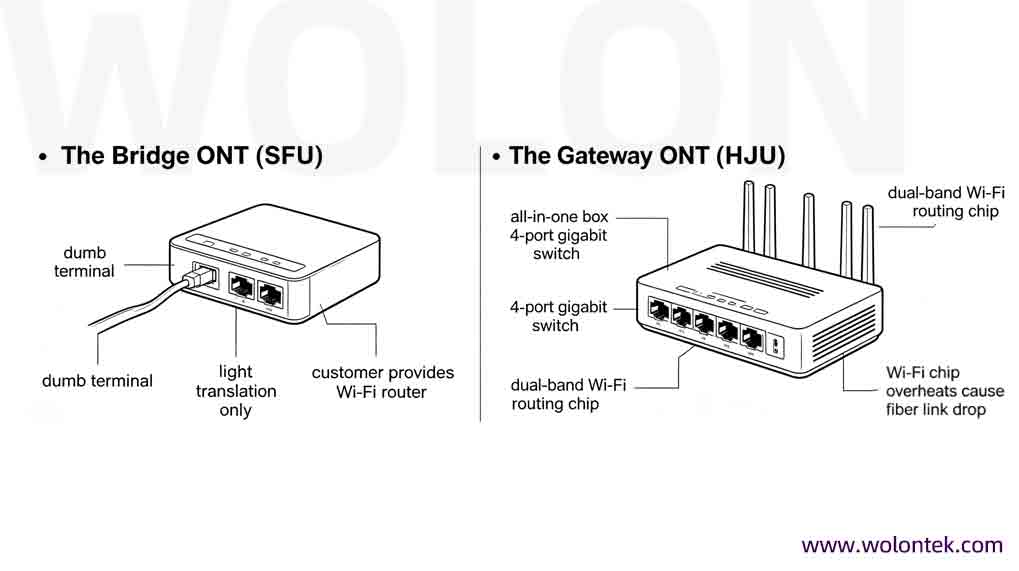
1.Bridge ONT (SFU – Single Family Unit): A basic, no-frills translator with one fiber input and one Ethernet output. It does not route IP addresses or broadcast Wi-Fi. The customer must provide their own wireless router.
2.Gateway ONT (HGU – Home Gateway Unit): The all-in-one box. The ISP integrates the optical translator, a multi-port gigabit switch, and a dual-band Wi-Fi routing chip into a single chassis. (Often called an “ONT Router”).
3.Outdoor ONT: A ruggedized, weather-proof enclosure mounted on the exterior wall of a building. It withstands extreme temperatures, passing only a durable copper Ethernet cable through the wall into the home.
Bridge ONT vs Gateway ONT: What Are You Actually Deploying?
Not all ONTs are identical. ISPs generally deploy two distinct flavors depending on how much control they want over the customer network.
The Bridge ONT (SFU): This is a dumb terminal. One fiber port in, one Ethernet port out. It does the light translation and stops there. The customer provides their own Wi-Fi router. It is cheap, bulletproof, and rarely crashes.
The Gateway ONT (HGU): This is the all-in-one box. The ISP crams the optical translator, a 4-port gigabit switch, and a dual-band Wi-Fi routing chip into the same plastic housing. It is convenient for installation, but if the Wi-Fi chip overheats, the entire fiber link drops.
How Do You Install an ONT?
For field technicians, installing an ONT requires strict physical cleanliness and software authentication:
-
Fiber Routing: Pull the indoor fiber drop cable to the ONT, ensuring the cable never exceeds its minimum bend radius.
-
Connector Cleaning: Use a one-click fiber cleaner on the green SC/APC connector. A single microscopic speck of dust will cause massive insertion loss and blind the ONT.
-
Physical Connection: Insert the SC/APC connector into the PON port until it clicks, then plug in the power supply.
-
OLT Provisioning: The technician must log into the ISP’s system and register the ONT’s serial number so the central OLT recognizes and authenticates the new hardware.
How Do I Troubleshoot When My ONT Goes Out?
Before calling an ISP support line, look at the LED indicator lights on the front of the ONT box. They will tell you exactly where the physical layer is failing:
-
Red LOS (Loss of Signal) Light: The ONT is completely blind. It is receiving zero light. The fiber cable is broken inside the wall, the connector is unplugged, or a tree took down the main line on the street.
-
Flashing PON Light: The ONT sees the light, but the ISP’s central equipment refuses to authenticate it. This is usually a software provisioning error or a dirty fiber connector.
-
Solid Green PON, No Internet: The fiber link is flawless. The problem is on the copper side—check the Ethernet cable connecting the ONT to your Wi-Fi router, or reboot the router.
Stop Paying Distributor Taxes on FTTH Hardware
The ONT is the ultimate bottleneck of a fiber network. You can deploy 10G-PON at the street, but if the end-user has cheap, overheating endpoint hardware, their speeds will crawl.
Furthermore, because you have to put an ONT in every single house, it is the heaviest CAPEX burden in any FTTH rollout. Sourcing these units, along with the drop cables and distribution boxes, through local distributors adds a massive markup.
Wolon builds the physical layer. Operating directly from our 400-employee manufacturing base in Wuhan’s Optical Valley, we bypass the middlemen. We supply telecom operators with strict-tolerance fiber optic drop cables, rugged distribution boxes, and the endpoint hardware required to light up a city.
Stop bleeding your deployment budget.
 Planning an FTTH Deployment?
Avoid costly optical budget overruns and compatibility issues. Contact the Wolontek Engineering Team to comprehensively audit your FTTH Bill of Materials (BOM) before you build.
Request a Free BOM Audit
What does ONT stand for?
ONT stands for Optical Network Terminal. It is the final endpoint device in a Fiber-to-the-Home (FTTH) network, translating light pulses from the fiber optic line into electrical Ethernet signals.
Is an ONT the same as a modem?
Technically, no. Modems modulate analog frequencies over copper wire. An ONT performs digital photoelectric conversion (light to electricity) over glass fiber. However, because it serves the same gateway purpose for the end-user, it is frequently referred to as a “fiber modem.”
What type of cable plugs into an ONT?
An ONT uses two primary cables. The input is a fiber optic drop cable, almost exclusively using a green SC/APC connector. The output is a standard copper Cat5e or Cat6 Ethernet cable that runs to your Wi-Fi router.
Why is my ONT showing a Red LOS light?
LOS stands for Loss of Signal. A red LOS light indicates a physical layer failure—the ONT is receiving zero light. This means the fiber cable is physically broken, the connector has been pulled out, or there is an outage at the ISP’s street cabinet.
What is an ONT cable?
An ONT requires two main cables: A fiber optic drop cable (usually with a green SC/APC connector) brings the light signal into the device, and a standard copper Ethernet cable sends the electrical signal out to your local network.
Why is my ONT box flashing a red LOS light?
LOS stands for Loss of Signal. A red light means the ONT’s optical receiver is detecting zero light. This indicates a physical break in the fiber optic cable, an unplugged connector, or an outage at the ISP’s street cabinet.