
Published: 2026 | Category: Network Hardware Knowledge Base / Optical Communications Core Keywords: SFP Module, SFP Transceiver, Small Form Factor Pluggable, What is SFP, SFP vs SFP+ Read Time: Approx. 25 Minutes
Introduction
Even in the era of Wi-Fi 7 and 5G, Optical Transceivers remain the backbone of the internet. From the core connections of enterprise LANs to the 400G/800G fabrics of hyperscale data centers, SFP modules are ubiquitous.
What is an SFP? SFP (Small Form-factor Pluggable) is a compact, hot-pluggable network interface module used to connect network devices (switches, routers, firewalls) to fiber optic or copper cables. Think of it as the “translator” for your network equipment, converting electrical signals into optical signals (light) and vice versa.
The State of SFP in 2026 Is SFP technology outdated? Far from it. With the advancement of the SFP112 standard and the increasing demand for low-power solutions in green data centers, this form factor continues to evolve.
Our Promise By the end of this guide, you will no longer be confused by “Single Mode vs. Multimode,” mismatched wavelengths, or dreaded “Port Error” messages. This is your definitive roadmap from SFP basics to expert-level deployment.

Part 1: Physics & Protocols — The Foundation of SFP
To truly understand “What is SFP,” we cannot view it merely as hardware; it is the crystallization of optical engineering and standardized protocols.
1.1 Definition & Origin: The Power of the MSA
The SFP (Small Form-factor Pluggable) is a compact, hot-pluggable optical transceiver module used for telecommunication and data communications applications. Before its birth, The Networking world was dominated by the GBIC (Gigabit Interface Converter). GBIC was bulky (roughly twice the size of an SFP), resulting in very low port density on switch panels.
The emergence of SFP (often referred to as Mini-GBIC) revolutionized this landscape. However, the core of SFP’s success lies not in its size, but in the MSA (Multi-Source Agreement).
Expert Note: SFP is not standardized by any single official body like the IEEE. Instead, it is defined by a consortium of optical module manufacturers (such as Finisar, Molex, etc.) through the MSA.
Why does this matter? The MSA ensures consistency in physical dimensions, pin definitions, and electrical interfaces. This is the legal and technical foundation that allows you to plug a third-party module into a Cisco, Juniper, or Huawei switch and have it fit physically perfectly.
 Why MSA Compliance is Your Best Friend
At WolonFiber, we don’t just follow MSA standards—we master the coding. Every module from our Wuhan manufacturing facility is programmed and tested on real-world Cisco, Juniper, and Arista hardware to ensure a perfect “handshake” recognition every time.
Check Compatibility & Get Factory Pricing
 1.2 Hardware Anatomy: What’s Inside the Black Box?
Although an SFP looks like a simple metal casing, its interior is a highly sophisticated optoelectronic conversion system. Let’s dissect it like a surgeon:
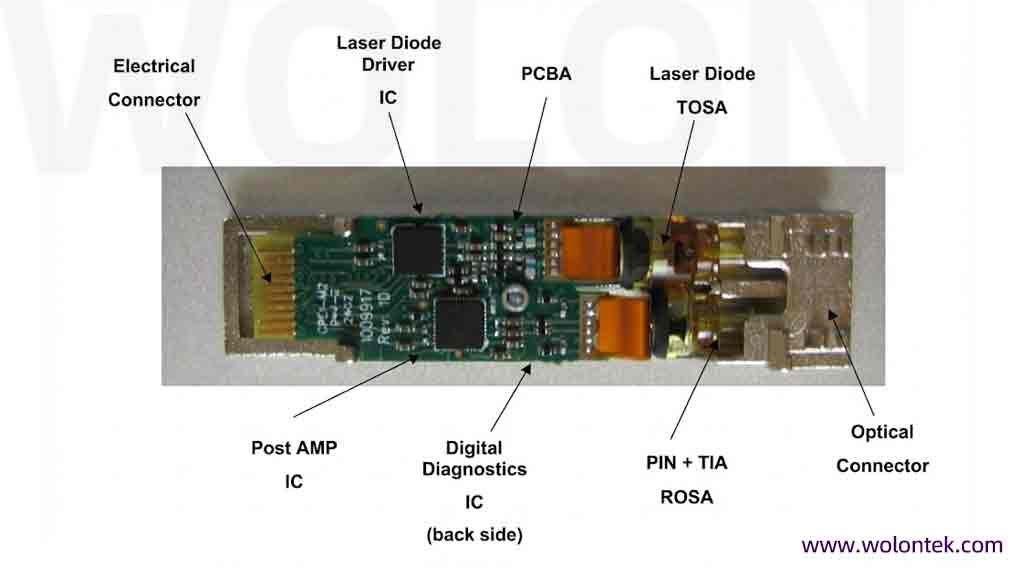
A. TOSA (Transmitter Optical Sub-Assembly)
The heart that converts electrical signals into optical signals. Depending on distance and cost, TOSAs use different laser technologies:
-
VCSEL (Vertical-Cavity Surface-Emitting Laser): Low cost, large light spot, typically used for Short Range (SR) multimode fiber.
-
FP (Fabry-Perot) Laser: Used for low-to-medium speed and distance.
-
DFB (Distributed Feedback) Laser: Narrow spectral width, used for Long Range (LR/ER) single-mode transmission.
-
EML (Electro-absorption Modulated Laser): Used for ultra-long distances (ZR) or high speeds (e.g., 100G) to minimize chromatic dispersion.
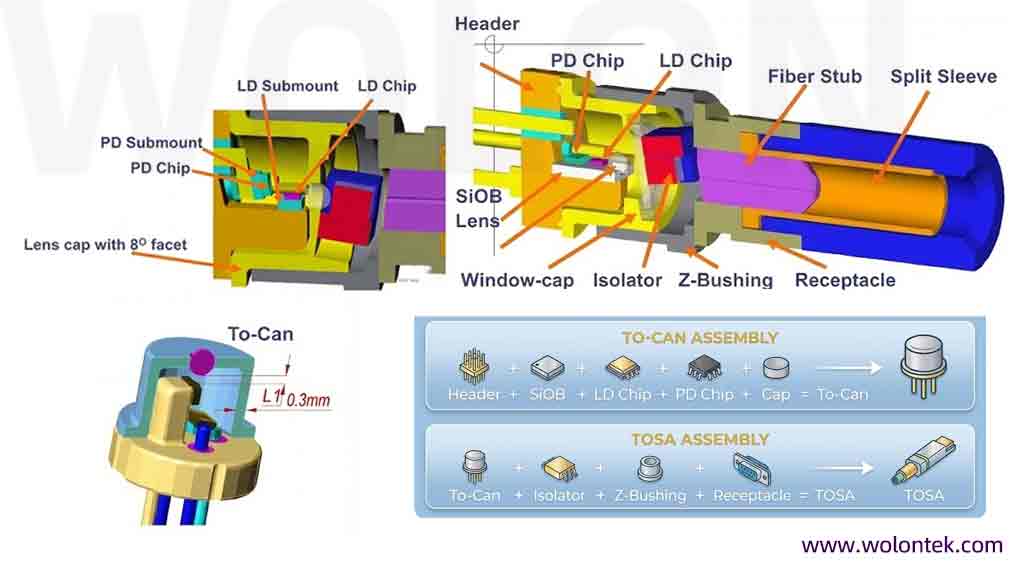
B. ROSA (Receiver Optical Sub-Assembly)
The “ears” that convert optical signals back into electrical signals.
1.PIN (Photodiode): Standard sensitivity, used for most short-to-medium range links.
2.APD (Avalanche Photodiode): Features an “amplification” effect with extremely high sensitivity. Dedicated to 40km, 80km, or further limits.
Warning: Never connect two APD modules directly with a short patch cord; the strong light will instantly burn out the high-sensitivity receiver.
C. EEPROM & MCU — The Identity Card
On the PCB board sits a crucial EEPROM chip. It stores the module’s specific information:
-
Vendor Name
-
Serial Number
-
Vendor Specific ID (The “Code”)
Tech Reveal: When your switch reports “Transceiver Not Supported,” it is usually because the switch OS (like Cisco IOS) read this EEPROM and found it didn’t match the OEM encryption code. This is why third-party compatible modules require specific “Coding.”
1.3 The Physical Interface: Identifying Your Connection
SFP modules are defined by their “Small” form factor, but the interface determines what you can actually plug into them. In the SFP world, there are three main interface standards you must know.
A. LC Connector (The Absolute Standard)
Status: Used in 95% of SFP/SFP+ optical transceivers.
Full Name: Lucent connector (or Little Connector).
Technical Spec: Uses a 1.25mm ceramic ferrule. It is exactly half the size of the older SC Connector, which is why SFP switches can fit 48 ports in 1U.
Two Configurations:
-
Duplex LC: The most common. Two fiber ports (TX and RX) side-by-side. Used for standard SR, LR, and ER modules.
-
Simplex LC: single fiber port. Used for BiDi (Bidirectional) modules where data is sent and received on the same strand using different wavelengths.
B. SC Connector ( The PON Specialist)
Status: Rare in data centers, standard in Telecom/FTTH (Fiber to the Home).
Full Name: Subscriber Connector (or Square Connector).
Technical Spec: Uses a larger 2.5mm ferrule with a square plastic body.
Where you see it: You will almost strictly find SC interfaces on PON (Passive Optical Network) modules—specifically OLT (Optical Line Terminal) or ONU Stick modules.
Why: SC connectors are more robust for “last mile” ISP cabling but are too bulky for high-density enterprise switches.
C. RJ45 Interface (Copper SFP)
Status: Used for converting optical slots to electrical copper ports.
Technical Spec: Standard 8-pin modular connector.
Function: Allows an SFP slot to accept standard Cat5e/Cat6/Cat6a Ethernet cables.
Limitation: Unlike fiber interfaces which can reach 100km, RJ45 SFPs are strictly limited to 100m (at 1G) or 30m (at 10G) due to signal degradation and power consumption over copper.
Related Reading: [LC vs SC SFP Module: Key Differences & 2026 Buying Guide]
Part 2: Generational Evolution (1G to 112G)
As bandwidth demand explodes, the SFP Form Factor has remained surprisingly consistent, yet the speeds it carries have increased 100-fold. This often confuses users regarding “same look, different speed.”
2.1 The SFP Family Tree: Speed Evolution
| Form Factor | Lanes | Rate Per Lane | Total Speed | Encoding | Typical Application |
|---|---|---|---|---|---|
| SFP | 1 | 1 Gbps | 1 Gbps | NRZ | Enterprise Access Switches, 1G Uplinks |
| SFP+ | 1 | 10 Gbps | 10 Gbps | NRZ | Data Center Server Access, 10G Aggregation |
| SFP28 | 1 | 25 Gbps | 25 Gbps | NRZ | 5G Fronthaul, AI Cluster NICs |
| SFP56 | 1 | 50 Gbps | 50 Gbps | PAM4 | Next-Gen High-Density Compute |
| SFP112 | 1 | 100 Gbps | 112 Gbps | PAM4 | Core Network Trend2026 FUTURE Next-Gen Routers |
Table: From 1G to 112G – The evolution of the Small Form-factor Pluggable module.
2.2 Key Tech Leap: From NRZ to PAM4
Before SFP28 (25G), we primarily used NRZ (Non-Return-to-Zero), using high/low voltage levels to represent 1 and 0. However, for SFP56 and SFP112, physical bandwidth hit a limit. Engineers introduced PAM4 (Pulse Amplitude Modulation 4-level). PAM4 transmits 2 bits (00, 01, 10, 11) in one clock cycle, doubling the bandwidth without increasing the baud rate.
The Significance of SFP112: It is the current pinnacle of the SFP family. It allows for 100G transmission within the existing SFP panel density, meaning future switches can offer 48 ports of 100G in a 1U panel without using the bulkier QSFP28.
2.3 Deep Insight: SFP vs. QSFP (The Lane War)
This is a common point of confusion for beginners.
-
SFP Series (SFP, SFP+, SFP28) is always Single Lane (1 Channel).
-
QSFP Series (QSFP+, QSFP28) is Quad Lane (4 Channels). The “Q” stands for Quad.
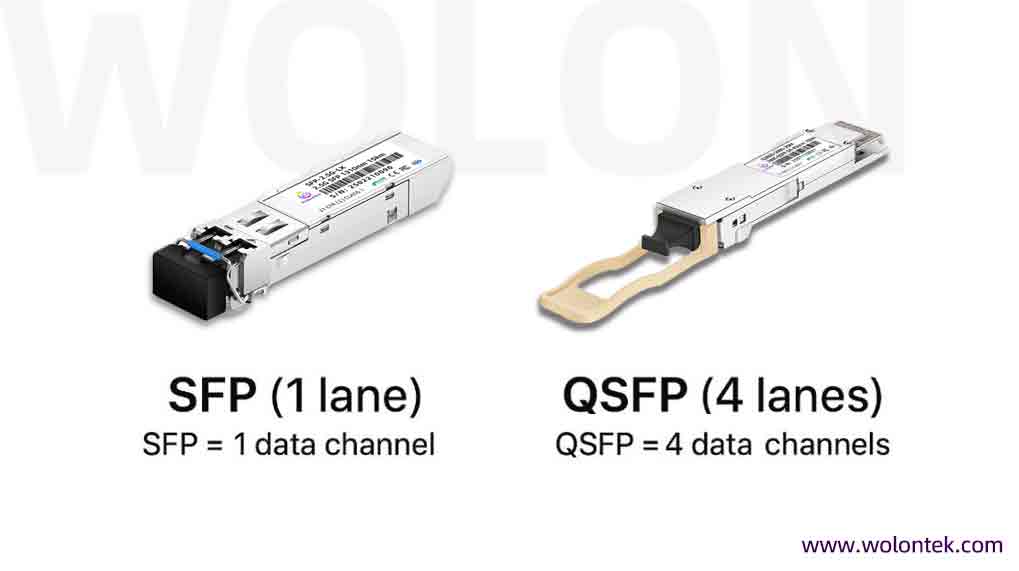
Connection Strategy: Since the lane counts differ, how do they connect? You can use a Breakout Cable. For example, using an MPO-to-LC breakout cable, you can split one 100G QSFP28 port into four 25G SFP28 ports to connect four separate servers.
Related Reading: [SFP VS QSFP: How to Decide Which Module Your Switch Needs]
 Designing a 100G/400G Breakout Architecture?
Migrating from 10G to 100G/400G requires precision. Don’t risk downtime with mismatched components. WolonFiber provides fully tested “Transceiver + Breakout MPO/MTP Cable” bundles with guaranteed end-to-end compatibility for high-density environments.
Consult Our Architects for a Free Upgrade Plan
Part 3: Classification by Transmission Media
SFP modules are categorized into three main types based on the transmission medium: Optical, Copper, and Direct Attach.
3.1 Optical Transceivers
The most mainstream category. Divided into Multimode Module and Singlemode Module based on fiber type.
A. Multimode Fiber (MMF)
Core Feature: Thicker core (50/62.5μm), allows multiple light modes, high dispersion, short distance.
Wavelength: 850nm (most common).
Standard Code: SR (Short Range).
Fiber Type: Used with OM3 (Aqua) or OM4 (Violet) fiber.
Identification: Black or Beige bail clasp (latch).
Scenario: Intra-rack connections, same-floor cabling (usually < 300m).
B. Singlemode Fiber (SMF)
Core Feature: Extremely thin core (9μm), light travels in a single mode, low attenuation, suitable for long distances.
Wavelength: 1310nm, 1550nm, or CWDM/DWDM wavelengths.
Standard Codes:
1.LR (Long Range): 10km, 1310nm, Blue latch.
2.ER (Extended Range): 40km, 1310nm/1550nm, Red latch.
3.ZR (Zeal Range): 80km+, 1550nm, Green/White latch.
4.BiDi (Bidirectional): Transmission over a single fiber strand, usually used in pairs (e.g., TX1310/RX1490), typically Purple/Blue latches.
Fiber Type: Used with OS2 (Yellow) fiber.
3.2 Copper SFP Module (RJ45 SFP Module)
Not all equipment comes with fiber ports. Copper SFPs allow you to convert an SFP slot into a standard RJ45 Ethernet port.
-
Scenario: Utilizing existing Cat5e/Cat6/Cat6a copper cabling resources for network upgrades.
-
Distance Limit: Typically limited to 30m – 100m.
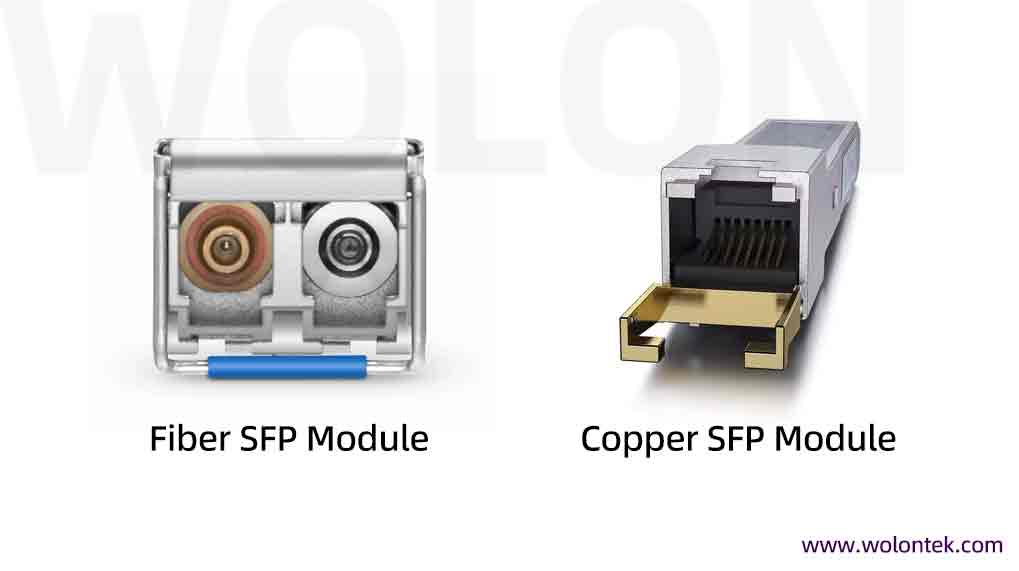
⚠️ Industry Pain Point: The “Heat” of 10G Copper Many users find that 10G SFP+ to RJ45 modules run very hot. Reason: The 10GBASE-T PHY chip consumes high power (typically > 2.5W), whereas SFP+ slots are originally designed for optical modules consuming < 1W. Advice: When using 10G Copper modules, avoid fully populating 48 ports side-by-side. Leave gaps to ensure heat dissipation.
Related Reading: [SFP vs RJ45 module Ethernet: 5 Key Advantages & Best Use Cases Explained]
 Struggling with 10G Copper Overheating?
High power consumption (>2.5W) from RJ45 modules drastically shortens switch lifespan. Within the same rack? Ditch the heat. Switch to WolonFiber’s 10G DAC (Direct Attach Cables). They consume near-zero power (<0.1W), generate zero heat, and cost significantly less.
Request Pricing for Low-Power DAC Solutions
3.3 Direct Attach Cables (DAC & AOC)
For very short distances inside a rack (< 7 meters), using standalone Optical modules + patch cords is expensive and cumbersome. Enter DAC and AOC.
DAC (Direct Attach Copper): “High-speed copper cable.” No lasers; direct copper connection.
Pros: Extremely low cost, zero latency, near-zero power consumption.
Recommended: ToR (Top of Rack) switch to server connections (< 5m).
AOC (Active Optical Cable): Optical Modules permanently attached to fiber.
Pros: Lightweight, longer distance than DAC (up to 30-100m), EMI immunity.
Recommended: Cross-rack connections.
Related Reading: [Dac Vs Aoc: Performance, Cost]

Part 4: Digital Diagnostics Monitoring (DDM/DOM)
Professional network administrators don’t just care if the link is “up”; they care about its health. This involves DDM (Digital Diagnostics Monitoring) or DOM.
4.1 The 5 Vital Signs of DDM
Following the SFF-8472 protocol, DDM-enabled modules report the following data in real-time:
1.TX Power: Is the laser aging? (Low power means aging; too high can burn the receiver).
2.RX Power: Is the line attenuation normal? (Low power indicates fiber bends or dirty connectors).
3.Temperature: Is the module overheating? (A common cause of packet loss).
4.Vcc (Voltage): Is the switch power supply stable?
5.Bias Current: The working current status of the laser.
4.2 Practical Lab: Cisco CLI Troubleshooting
As a network engineer, when a link is unstable, don’t just swap the cable. Check the command line first.
Output Interpretation (Example Data):
| Parameter | Value (Current) | High Alarm | Low Alarm | Status |
|---|---|---|---|---|
| Transmit Power | -2.5 dBm | 1.0 dBm | -13.0 dBm | ✅ Normal |
| Receive Power | -25.2 dBm | 1.0 dBm | -23.0 dBm | Low Alarm |
If Receive Power shows
-25dBm or lower (like above), the light is too weak. This usually indicates:
- A broken fiber strand.
- A severely dirty connector (Clean it!).
- Wrong Patch Cord: Plugging a Multimode cable into a Singlemode module.
Stuck with a generic (3rd party) module that the switch refuses to accept? In a lab environment, you can try:
(config)# no errdisable detect cause gbic-invalid
⚠️ Caution: Use with care. This allows third-party modules (like Wolon’s compatible SFPs) to function but may bypass warranty safeguards on the switch.
Part 5: 2026 SFP Buying & Compatibility Guide
5.1 Third-Party Compatible vs. OEM
This is the most common dilemma in procurement.
-
OEM (Cisco/HP/Juniper): Expensive (often 10x the price of third-party), but offers single-source official support.
-
Third-Party: Extremely cost-effective.
-
Verdict: As long as the supplier provides perfect EEPROM Coding Services and Real-Device Testing, third-party modules perform identically to OEMs. The key is choosing a supplier with technical capability, not just a box-pusher.
5.2 The Ultimate Selection Checklist
Confirm these 5 points before ordering:
1.Speed Match: Is the switch port SFP (1G) or SFP+ (10G)? Some SFP+ ports are not backward compatible with 1G.
2.Wavelength/Distance: Do not mix wavelengths (e.g., 1310nm on one end and 850nm on the other will not work).
3.Fiber Type: Yellow cable pairs with Blue modules (SMF); Orange/Aqua pairs with Black modules (MMF).
4.Device Brand: Inform the supplier of your equipment brand (Cisco, HP, Aruba, Huawei…) for correct coding.
5.Industrial Needs: Is the environment harsh? Commercial Temp (0~70°C) vs. Industrial Temp (-40~85°C).
 Tired of Cross-Referencing Part Numbers?
You don’t have to be a fiber optics expert to secure the right equipment. Stop manually checking specs for expensive OEM parts (Cisco, Juniper, HP). Send us your Bill of Materials (BOM), and our engineers will map it to WolonFiber’s 100% compatible equivalents. Get a factory-direct quote within 24 hours and save up to 70% with zero guesswork.
 Upload Your BOM / Get a Quote
Conclusion
From 1G to 112G, SFP modules have proven the brilliance of their design and their enduring relevance. Understanding SFP internal architecture, wavelength classification, and DDM diagnostics not only helps you build efficient networks but also saves valuable troubleshooting time when issues arise.
Next Steps: Is your network facing an upgrade from 1G to 10G, or are you planning 25G server access?
Copyright © 2026 Wolon/Wolontek. All Rights Reserved.

Frequently Asked Questions (FAQ)
Q: Can I plug an SFP+ (10G) module into a standard SFP (1G) port?
A: Generally, no. SFP+ modules typically cannot negotiate down to 1G speeds in a standard SFP port. However, the reverse is often true: you can usually plug a standard 1G SFP module into a 10G SFP+ port, and it will operate at 1G speeds.
Q: Will third-party (compatible) SFPs void my switch warranty?
A: Legally, no. In most regions (including the US via the Magnuson-Moss Warranty Act), manufacturers cannot void a warranty simply for using third-party hardware. However, if the SFP itself causes damage to the port (which is rare with high-quality vendors like Wolontek), that specific repair might not be covered.
Q: What happens if I connect a Single Mode SFP to Multimode fiber?
A: It will likely fail or suffer from massive packet loss. Single Mode lasers (1310nm) are too narrow for the wide core of Multimode fiber, causing a phenomenon called “Differential Mode Delay” (DMD). Always match the color of the module latch (Blue/Yellow) to the cable jacket (Yellow).
Q: Do SFP modules need cleaning?
A: Absolutely. Dust is the #1 enemy of optical networks. Even microscopic dust particles on the fiber ferrule can block the laser or burn permanently onto the lens due to heat. Always use a One-Click Fiber Cleaner or cassette cleaner before mating connectors.
Q: What is the difference between SFP and SFP112?
: They share the same physical size (form factor) but differ vastly in speed and technology. Standard SFP runs at 1Gbps using NRZ encoding. SFP112 runs at 112Gbps using advanced PAM4 encoding, designed for next-generation 100G/400G networks in 2026.