
Look at the back of any standard Wi-Fi router or FTTH gateway. You will see a row of identical RJ45 Ethernet ports. Usually, one is physically separated from the rest and painted a different color (like yellow or blue).
The separated one is the WAN port. The grouped ones are the LAN ports.
To a consumer, they look like the exact same physical connection. But internally, the router treats them as two completely separate universes. Plugging your internet feed into the wrong port won’t just keep you offline—it can create IP address conflicts that take down your entire network or bypass your firewall completely.
If you are setting up network infrastructure, provisioning FTTH hardware, or just trying to wire an office router correctly, here is the strict engineering reality behind the WAN vs LAN architecture, what these ports actually do, and why they exist.
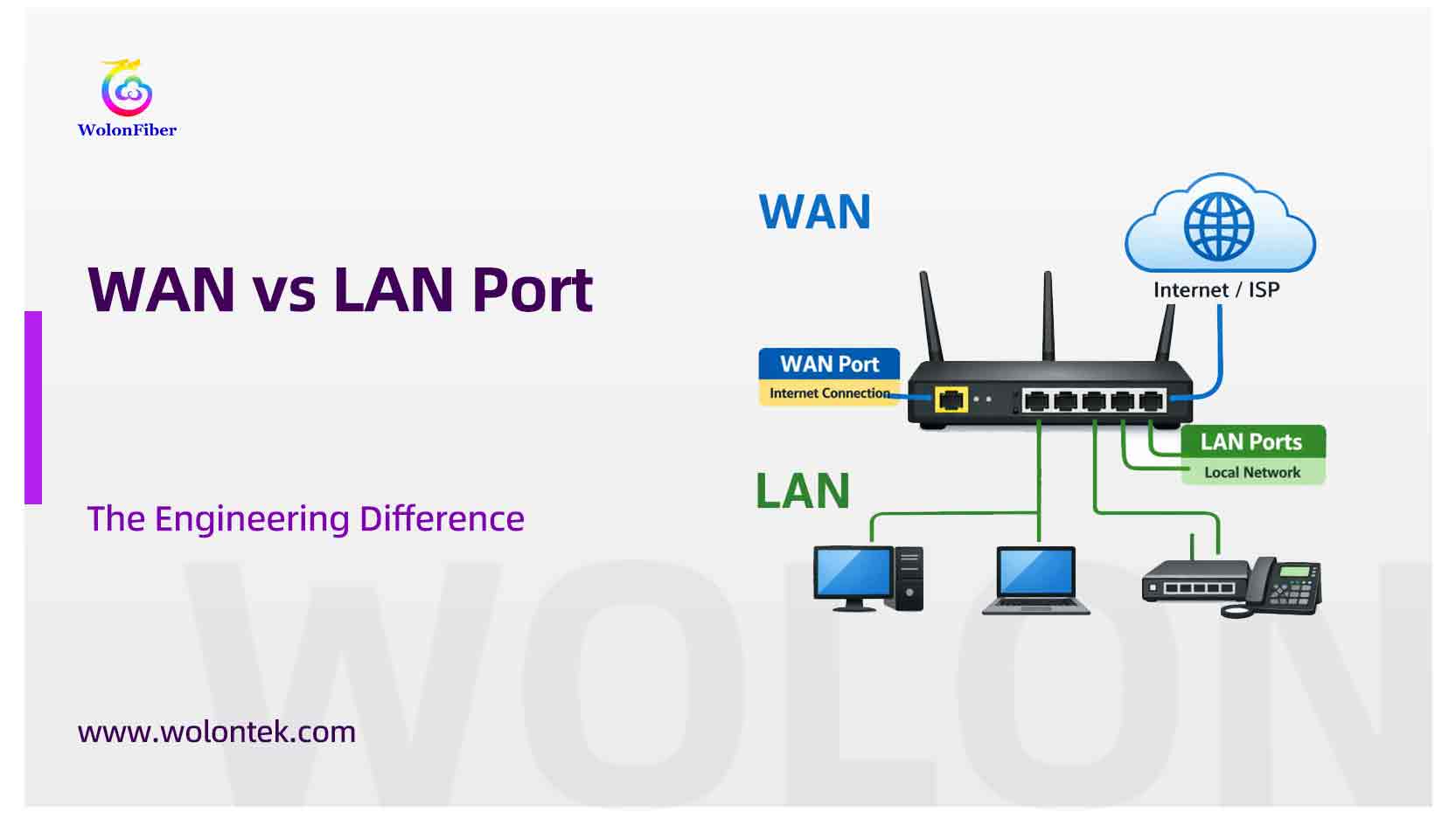
wan vs lan port
What is a WAN Port? (The Outside World)
WAN stands for Wide Area Network. In the context of a home or enterprise network, the WAN is simply the public Internet.
The WAN port (sometimes labeled “Internet”) is the designated physical entry point for your network. It is where the outside world comes in.
-
If you have cable internet, the Ethernet cord goes from the cable modem into the WAN port.
-
If you have a fiber optic connection with a basic Bridge ONT, the Ethernet patch cord goes from the ONT into the ethernet wan port on your router.
What happens at the WAN port? This is the only port on your router that faces the raw, unfiltered internet. The ISP assigns a single Public IP Address directly to this port. Everything hitting this port is scrutinized by the router’s strict hardware firewall before it is allowed to pass inside.
What is a LAN Port? (The Local Network)
LAN stands for Local Area Network. This is your private, internal network.
A standard wan router typically has four LAN ports grouped together. These ports are the outputs. They are used to hardwire your internal devices—like computers, network printers, IP cameras, and smart TVs—so they can talk to each other and share the internet connection.
What happens at the LAN port? Devices plugged into a LAN port are safe behind the router’s firewall. The router uses its internal DHCP server to hand out Private IP Addresses (usually starting with 192.168.x.x) to every device connected here.
WAN vs LAN Port Difference: The Engineering Breakdown
When you look at the wan and lan port difference, you are looking at the boundary line of a network. The router’s main job (using a protocol called NAT—Network Address Translation) is to act as the border patrol between the single WAN IP and the dozens of LAN IPs.
Here is the exact technical breakdown of lan vs wan:

Quick Reference: WAN vs. LAN Port
The Network Crash: Plugging WAN on LAN
The most common installation error field technicians encounter is a user accidentally plugging the active internet feed (from the modem/ONT) directly into a port lan.
What happens if you mix them up? If you plug the ISP connection into a LAN port, you bypass the router’s routing engine entirely. The router just acts like a “dumb” switch.
-
Your ISP will try to assign its single Public IP address to the first random device that asks for it (like your smart TV or your iPhone).
-
That single device might connect to the internet, but it will be completely exposed with zero firewall protection.
-
Every other device in your house will lose internet access completely because there are no more Public IP addresses available.
-
You create a massive DHCP conflict that crashes the local network.
Keep them separated. The feed from the street goes to the WAN. The cables going to your desks go to the LAN.
Where WAN and LAN Merge: FTTH Gateway ONTs
In legacy networks, you had two boxes: a modem (handling the WAN) and a router (handling the LAN).
In modern Fiber-to-the-Home (FTTH) deployments, ISPs are eliminating the physical wan vs lan port cable confusion by combining both devices into a single chassis. This is known as a Gateway ONT (Home Gateway Unit).
At wolonfiber, we manufacture these exact enterprise-grade endpoint devices. Operating from our 1000+-employee facility in Wuhan’s Optical Valley, we build Gateway ONTs where the “WAN port” is actually a direct optical PON receptacle (SC/APC) for the incoming fiber optic glass. The device internally translates the light, processes the firewall routing, and outputs directly to the 4 Gigabit RJ45 LAN ports on the back.

By sourcing Gateway ONTs directly from our manufacturing lines, telecom operators eliminate installation errors, reduce physical cable clutter, and drastically lower their hardware deployment costs.
Sourcing Hardware for Your FTTH Rollout?
Maximize your network ROI. Contact the WolonFiber engineering team for factory-direct quotes on high-performance FTTH Gateway ONTs and routing hardware.
Request a Factory-Direct Quote
What is a WAN port?
The WAN (Wide Area Network) port is the specific physical port on your router that connects to the outside internet. You plug the Ethernet cable coming from your modem or fiber ONT directly into this port.
What is a LAN port?
A LAN (Local Area Network) port is used to connect your personal devices to the router. Computers, gaming consoles, and network switches plug into the LAN ports to share the single internet connection provided by the WAN port.
What is the wan port lan port difference?
The WAN port receives the public internet and a public IP address from your Internet Service Provider. The LAN ports distribute that internet connection securely to your local devices using private IP addresses.
Can I use a LAN port as a WAN port?
On a standard consumer router, no. The ports are hardcoded in the firmware to perform specific routing and firewall tasks. However, on highly advanced enterprise routers (like Ubiquiti or MicroTik), engineers can re-assign and configure any physical port to act as either a WAN or a LAN.
Why is the WAN port a different color?
Manufacturers usually color-code the WAN port (often yellow or blue) and separate it slightly from the LAN ports to prevent users from accidentally plugging the internet feed into the wrong port, which would crash the local network.