
If you are building a server room or organizing a telecom closet, you already know what a patch panel purpose is: it acts as a static, protective barrier between the rigid in-wall cables and your expensive Ethernet switches.
But opening a catalog of rj45 patch panels can be overwhelming. You cannot just buy a random panel and hope it works. If you pair a 10G shielded cable with a basic unshielded panel, you immediately bottleneck your entire network. If you buy a flat panel for a high-density rack, you will run out of cable management space.
To make the right physical layer choices, network architects classify an RJ45 patch panel using four strict engineering parameters. Here is the complete breakdown of how to select the right hardware for your rack.
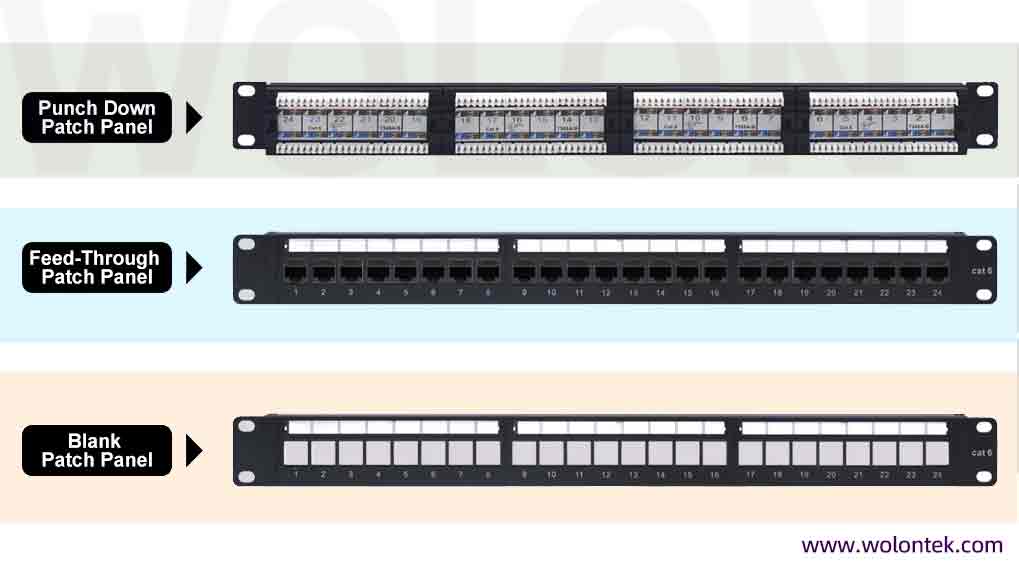
Types of RJ45 Patch Panels: By Termination Method
This is the most functional difference. It dictates how your technicians will physically attach the in-wall cables to the back of the rj45 jack panel.
Punch-Down Patch Panels
This is the traditional, old-school method. The rear of the panel features exposed Insulation Displacement connector (IDC) blocks. A technician must use a 110 punch-down tool to violently press the bare copper wires of the Ethernet cable into the metal slots.
-
The Reality: It is highly secure and cheap. However, terminating 48 ports on a ladder in a dark server room is exhausting. If one port breaks on the front, the entire panel is permanently scarred.
Feed-Through (Coupler) Patch Panels
This is the modern IT favorite. A feed-through panel has standard female RJ45 ports on both the front and the back.
-
The Reality: There is zero punching required. You simply terminate your in-wall cable with a standard RJ45 plug and click it into the back of the panel. It is incredibly fast to install and easy to troubleshoot.
Blank Keystone Patch Panels
The panel itself is just a heavy metal frame with empty square cutouts. You terminate your cables into separate “keystone jacks” and then snap them into the empty slots. This allows you to mix Cat6, Cat6a, and even fiber optic couplers on the exact same board.
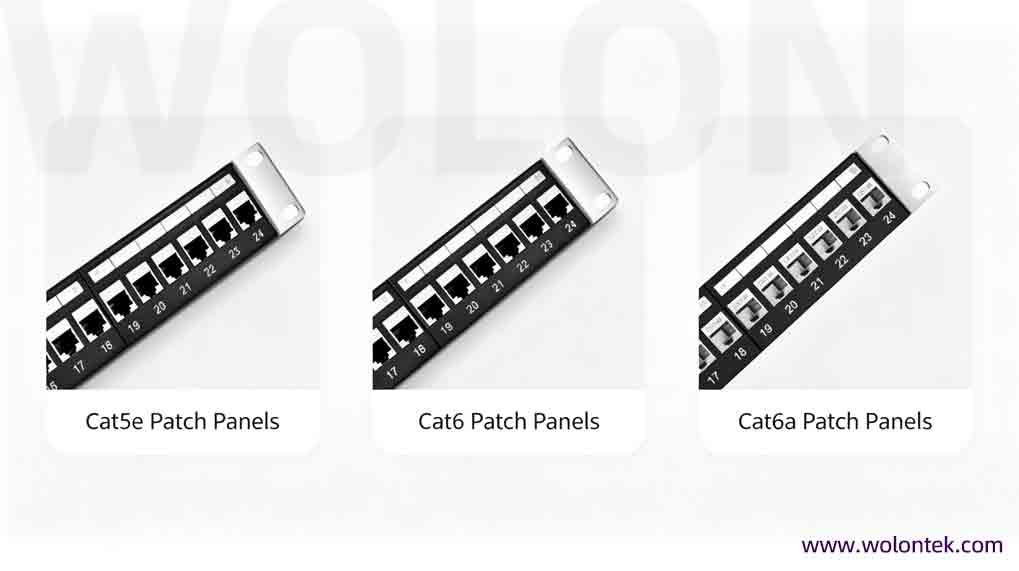
Types of RJ45 Patch Panels: By Cable Category
An Ethernet patch panel has no electronic processor, but its internal copper traces and pin spacing are heavily engineered to match the frequency of specific cables.
-
Cat5e Patch Panels: Designed for 1 Gigabit (100 MHz) networks.
-
Cat6 Patch Panels: Designed to support 1 Gigabit and 10 Gigabit (at short distances) operating at 250 MHz. The internal pins are optimized to handle thicker copper and reduce internal crosstalk.
-
Cat6a Patch Panels: The absolute standard for enterprise 10G networks. Engineered for massive 500 MHz frequencies.
The Golden Rule: Your patch panel must match (or exceed) the category of your in-wall cables and your flexible ethernet Patch Cable. If you run Cat6a in the walls but terminate it into a Cat5e panel, your network will downgrade to Cat5e speeds.
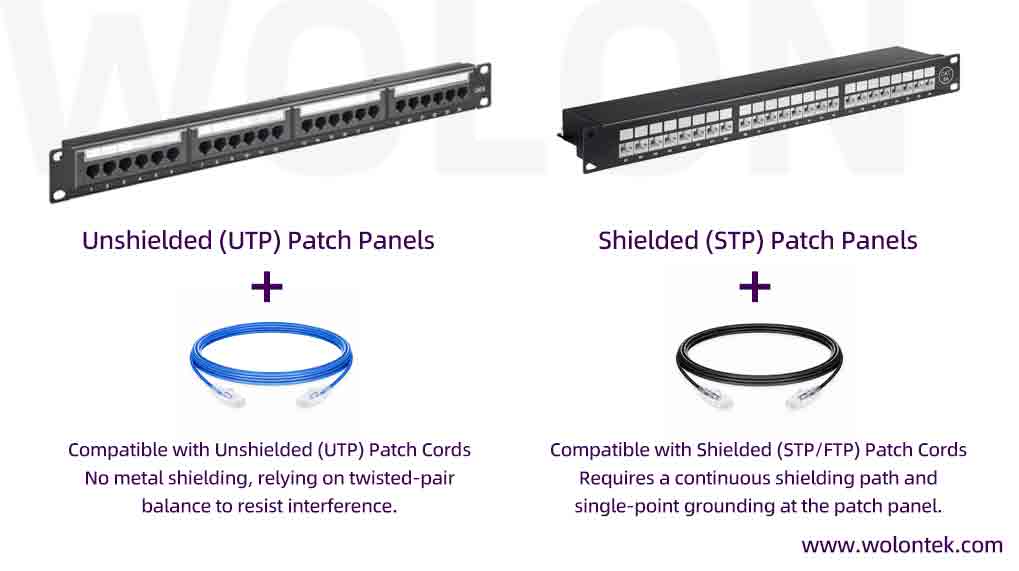
Types of RJ45 Patch Panels: By Construction
Your environment dictates this choice. Mixing shielded and unshielded hardware breaks the grounding chain and ruins data transmission.
-
Unshielded (UTP) Patch Panels: Used in 90% of standard office and home setups. They are designed for standard UTP copper cables that do not run near heavy electrical interference.
-
Shielded (STP) Patch Panels: If your cables run through industrial factories, hospital imaging rooms, or near massive power conduits, you must use heavily shielded S/FTP cables. A shielded patch panel features a fully enclosed metal casing around the rear RJ45 ports and a dedicated grounding wire. This wire safely drains Electromagnetic Interference (EMI) directly into the metal server rack, keeping your data pristine.
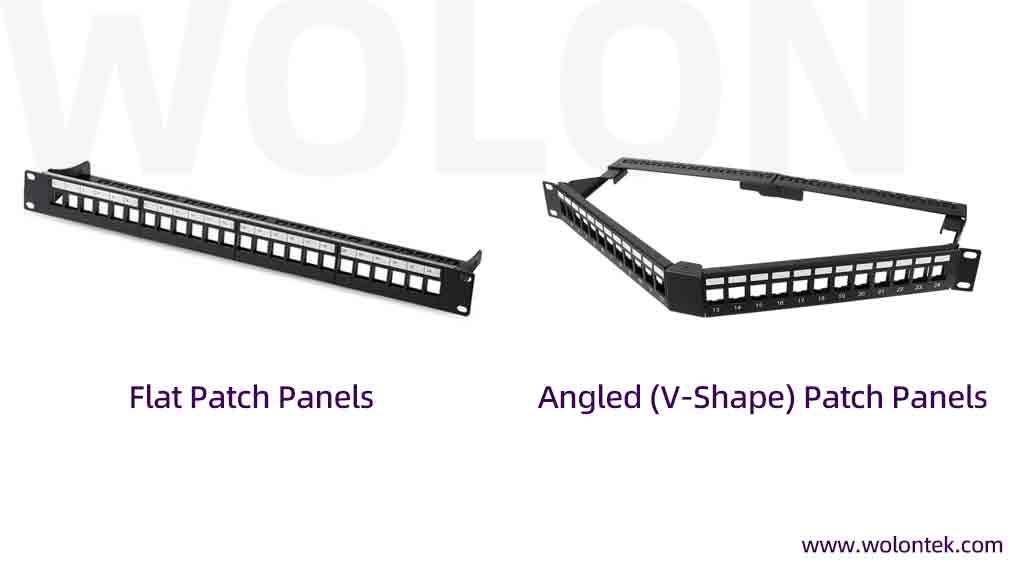
Types of RJ45 Patch Panels: By Appearance Design (Flat vs Angled)
When you are managing a 42U server cabinet, physical space is your most valuable asset. The shape of the network patch board dictates your cable routing.
-
Flat Patch Panels: The traditional straight design. When you use a flat panel, you must install a horizontal cable manager (usually taking up an extra 1U or 2U of rack space) directly above or below it to route the patch cords neatly to the sides.
-
Angled (V-Shape) Patch Panels: The panel points outward in a “V” shape. This genius physical design naturally forces the patch cords to route directly left and right into the vertical cable managers. It completely eliminates the need for horizontal managers, saving massive amounts of rack space in high-density data centers. However, angled panels require deeper cabinets so the doors can close.
Lock In Your Supply Chain with Wolontek
Whether you are standardizing the telecom rooms for a corporate campus or deploying FTTH infrastructure, sourcing passive hardware through multi-tiered distributors inflates your Bill of Materials (BOM) with 30% to 40% markups.
You need to partner with the physical source. Since 2010, Wolontek has been manufacturing the physical layer of the internet. Operating directly out of our 400-employee facility in Wuhan’s Optical Valley, we build strict-tolerance infrastructure. We supply telecom operators and enterprise data centers with factory-direct heavy-gauge patch panels, precision-tested patch cords, and fiber distribution frames.
Stop settling for overpriced trading company hardware.
 Upgrading Your IT Infrastructure?
Bypass distributor markups and secure enterprise-grade reliability. Contact the Wolontek Engineering Team today for factory-direct quotes and custom infrastructure planning.
Request a Factory-Direct Quote
What is a patch panel purpose?
The main purpose is cable management and hardware protection. It provides a static termination point for rigid in-wall cables, allowing you to use short, flexible Ethernet patch cables to connect to your switch. This prevents the switch ports from being damaged by heavy, moving cables.
What is a feed-through patch panel?
Unlike a punch-down panel that requires a specialized tool to terminate raw wires, a feed-through (or coupler) patch panel has standard RJ45 ports on both the front and the back. You simply plug an RJ45-terminated cable into the rear, and use another patch cord on the front.
Do I need a shielded or unshielded patch panel?
If the Ethernet cables inside your walls are unshielded (UTP), use an unshielded panel. If your cables are shielded (STP/FTP) to protect against heavy electrical interference, you must use a shielded patch panel with a grounding wire to maintain the protection circuit.
Why use an angled patch panel instead of a flat one?
Angled patch panels route cables directly to the sides of the rack into vertical managers. This completely eliminates the need to install horizontal cable management bars, saving valuable vertical space (U-space) in high-density server cabinets.