
Introduction
Choosing between single-mode and multi-mode fiber comes down to one simple question: where will the cable actually live, and how long must the light travel? Below I strip the jargon to the essentials you need to make a practical, cost-sensible choice for real networks — data centers, campus backbones, or long-haul links — and give clear rules of thumb you can act on today.
What they are (short and practical)
Single-mode fiber (SMF) has a very small core — about 9 µm — that carries one light mode. It’s optimized for long distances and low dispersion using laser sources.
multimode fiber (MMF) has a larger core (commonly 50 µm or 62.5 µm) that supports multiple light paths or “modes,” making it easier to couple light from cheaper sources (VCSELs/LEDs) but more limited in distance.
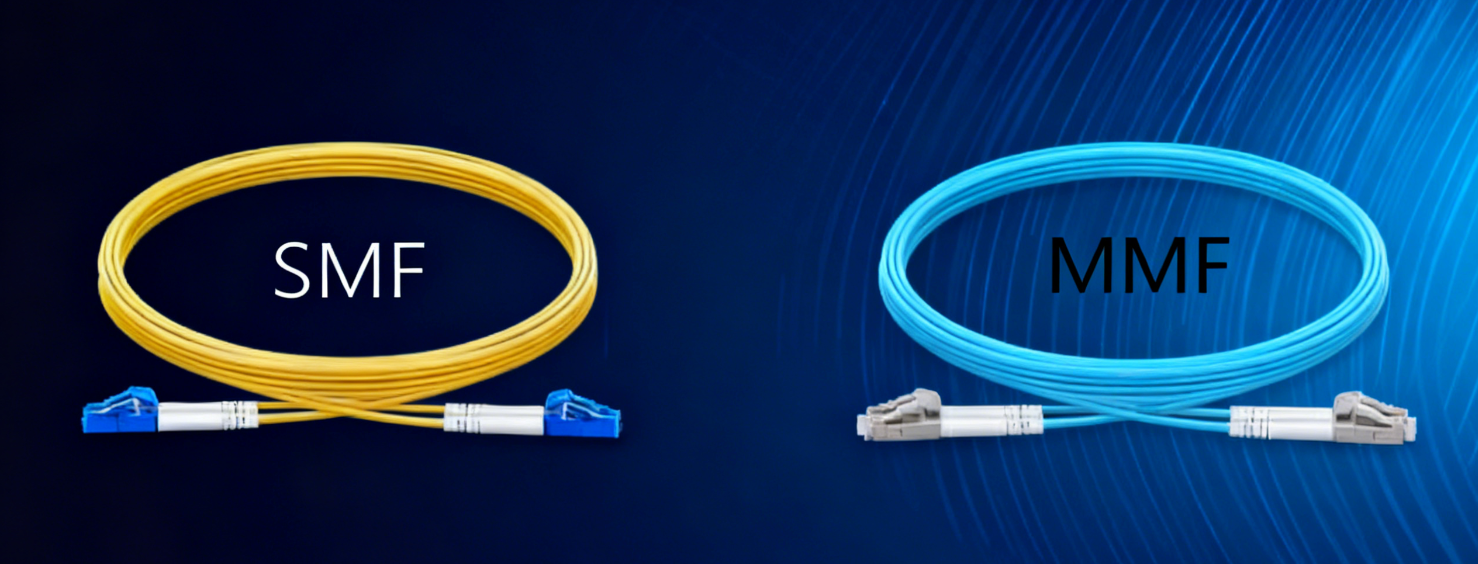
Summary Table:
|
Feature |
Single-Mode Fiber |
Multimode Fiber |
|---|---|---|
|
Core Size |
8–10 μm |
50/62.5 μm |
|
Light Source |
Laser (1310/1550 nm) |
LED/VCSEL (850/1300 nm) |
|
Distance |
>40 km (up to 200 km) |
≤2 km (best ≤550 m at 10 Gbps) |
|
Bandwidth |
High—almost unlimited |
Moderate to high, limited over distance |
|
Cost |
Higher (1.5–5× MMF for transceivers) |
Lower equipment and installation costs |
|
Installation |
Precision required, costlier |
Simpler, fast, cheaper in the field |
|
Dispersion |
Minimal modal dispersion |
Significant modal dispersion |
Key technical differences that matter in the field
Core size & light source: SMF’s ~9 µm core requires single-mode lasers; MMF’s 50/62.5 µm cores work with multimode lasers/VCSELs. This affects connector alignment, testing, and transceiver choices.

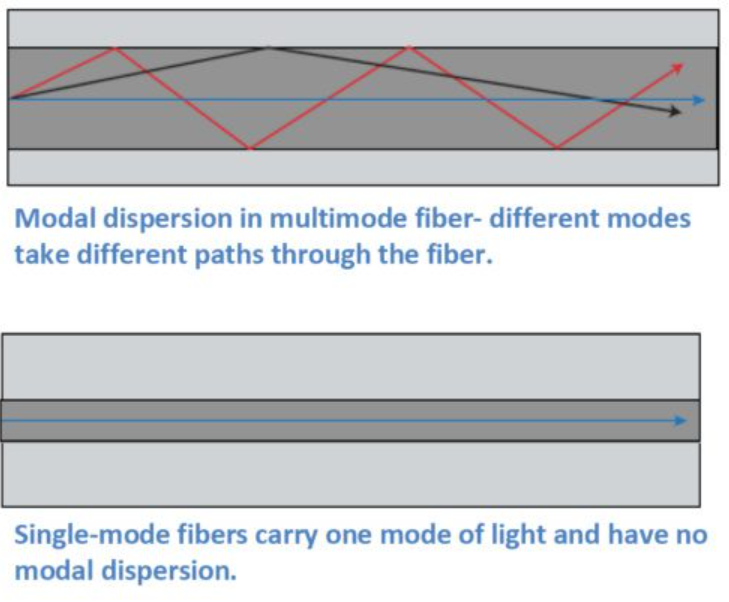
Modal dispersion: MMF’s multiple modes travel slightly different paths and arrive at different times, which limits bandwidth over distance; SMF avoids modal dispersion and therefore scales to much longer runs at higher bit rates.
Bandwidth × distance: Modern multimode (OM3/OM4/OM5) supports very high speeds for short runs — for example, 40/100 G over OM3/OM4 can work up to roughly 100–150 m (OM3/OM4 vary by optics), while single-mode links routinely span many kilometers. Use the multimode spec (OM class) and the optics’ datasheet to confirm exact reach for your targeted speed.
Realistic reach examples
-
Short links inside racks or within a single data hall: OM3 or OM4 multimode is commonly used — 10GbE can reach hundreds of meters on OM3/OM4; 40G/100G multimode optics typically list 100–150 m on OM3/OM4 depending on the module.
-
Campus or metropolitan backbones: single-mode (OS2) is the default; runs of several kilometers up to tens or hundreds of kilometers are routine with SMF and appropriate DWDM or CWDM optics.
Quick Comparison Table: Bandwidth & Distance At a Glance
|
Fiber Type |
Core Size (µm) |
Max Bandwidth (MHz·km) |
Maximum Practical Distance |
Max Data Rate (Gbps) |
Example Application |
|---|---|---|---|---|---|
|
Single-mode OS1 |
8–10 |
Unlimited |
10,000 m (10 km) |
up to 100 |
Campus/metro backbone |
|
Single-mode OS2 |
8–10 |
Unlimited |
200,000 m (200 km) |
up to 100 |
Long-haul backbone |
|
Multimode OM3 |
50 |
~2,000 |
300 m |
10–100 |
Data center, LAN zone |
|
Multimode OM4 |
50 |
~4,700 |
550 m |
10–100 |
High-performance DC |
|
Multimode OM5 |
50 |
28,000 |
400 m (400 Gbps/4f pairs) |
400 |
Next-gen high-density |
Cost
Cabling material alone is only one part of cost. Multimode transceivers (especially for short 10G links) are typically less expensive than single-mode lasers; however, MMF patch panels and replacement of short-reach optics at higher speeds can add lifecycle cost. Conversely, single-mode cable is often cost-competitive, but SMF transceivers (especially for very high bit-rates or special modulation/DWDM) can be pricier. In short: evaluate cable + transceivers + expected upgrades over the system lifetime, not just the raw cable price.
Installation & operations
Connector cleanliness and alignment matter more on single-mode links because of the smaller core. Testing tolerance is tighter.
Polarity and patching strategy: Data centers that use parallel optics (MPO/MTP) for 40/100G must match multimode types (OM3/OM4) to the optics. If you mix fiber types or try to reuse old OM1/OM2 for modern optics, you’ll hit distance and performance problems.
Summary Table: Single-Mode vs Multi-Mode Fiber Key Specs and Performance
Here’s a clear comparison of the main parameters, performance data, costs, and uses of single-mode vs multi-mode fiber. This table helps you assess which fiber type fits your network needs.
|
Feature |
Single-Mode Fiber |
Multi-Mode Fiber |
|---|---|---|
|
Core Diameter |
8–10 μm |
50 or 62.5 μm |
|
Cladding Diameter |
125 μm |
125 μm |
|
Light Source |
Laser (1310/1550 nm) |
LED or VCSEL (850/1300 nm) |
|
Propagation Mode |
Single path |
Multiple paths |
|
Bandwidth |
Very high, >100,000 GHz possible |
OM3 2000 MHz·km, OM4 4700 MHz·km, OM5 up to 28,000 MHz·km |
|
Max Transmission Distance |
Up to 100 km+ (10 Gbps, OS2 up to 200 km) |
OM4: up to 550 m (10 Gbps), OM5: up to 150–300 m (100–400 Gbps) |
|
Data Rates Supported |
10 Gbps, 40 Gbps, 100 Gbps, 400 Gbps+ |
1, 10, 40, 100, 400 Gbps depending on OM type |
|
Attenuation |
Lower |
Higher |
|
Dispersion |
Minimal modal dispersion |
Significant modal dispersion |
|
Cost (Fiber) |
Higher per transceiver system cost |
Lower for short runs and components |
|
Cost (Transceivers) |
Higher (Approx. 1.5–5× multimode) |
Much lower (prime cost advantage) |
|
Installation Complexity |
More complex. Often needs factory pre-termination. |
Easier. Supports field termination. Offers flexible upgrades. |
|
Application Example |
Telecom, Metro, Long-haul WAN, Backbone, ISP |
Data Center, Campus, Enterprise LAN, Short-range, Office |
How to decide — practical decision tree
1.Is the run ≤ 100–150 m and entirely inside a building or data hall?
— Yes → consider OM3/OM4 multimode for cost-effective transceivers and easy alignment. Confirm the optics’ distance table first.
2.Will you need 10G today but plan 40/100G later within the same physical plant?
— If future 40/100G in the same plant is likely and budget allows, prefer OM4 or install single-mode to avoid later costly migrations. OM4 extends multimode reach for higher speeds.
3.Are runs between buildings, across a campus, or city?
— Use single-mode (OS2). It’s the industry standard for long distances and for DWDM/CWDM systems.
4.Is long-term flexibility and future-proofing the top priority?
— Lean toward single-mode. Upgrading electronics on SMF often costs less than ripping and replacing multimode cabling when distances or speed requirements grow.
A few deployment tips that save money
Standardize: Pick one fiber type for major trunks (or plan clear demarcation if mixing). Mixing increases spare parts and complexity.
Test carefully: Use appropriate dB loss, OTDR, and insertion loss testing for the fiber class and optics you choose. SMF needs closer inspection and stricter loss budgets.
Document polish: Record fiber types, OM class, connector polarity, and patching diagrams — saves time when migrating optics.
Quick summary
For short, within-room or within-data-hall links where budget-friendly optics and ease of use matter, multimode (OM3/OM4) is often the right call. For campus, inter-building, metro, or any route where distances exceed a few hundred meters — or where you want the broadest future flexibility — single-mode (OS2) is the safer, more scalable choice. Check the optics’ datasheets for exact reach numbers before buying.
If you’re ready to specify cabling, WOLON offers a full range of fiber solutions engineered for each use case: laser-optimized OM3/OM4 multimode for high-density data halls (MPO/MTP-ready assemblies, low-loss connectors), and OS2 single-mode for campus and OSP backbones (armored, LSZH, and indoor/outdoor variants). Our cables are tested to industry standards, labeled for easy identification, and supplied with documentation and testing reports to speed deployment. Contact WOLON for fiber assemblies tailored to your topology and planned upgrade path.
