
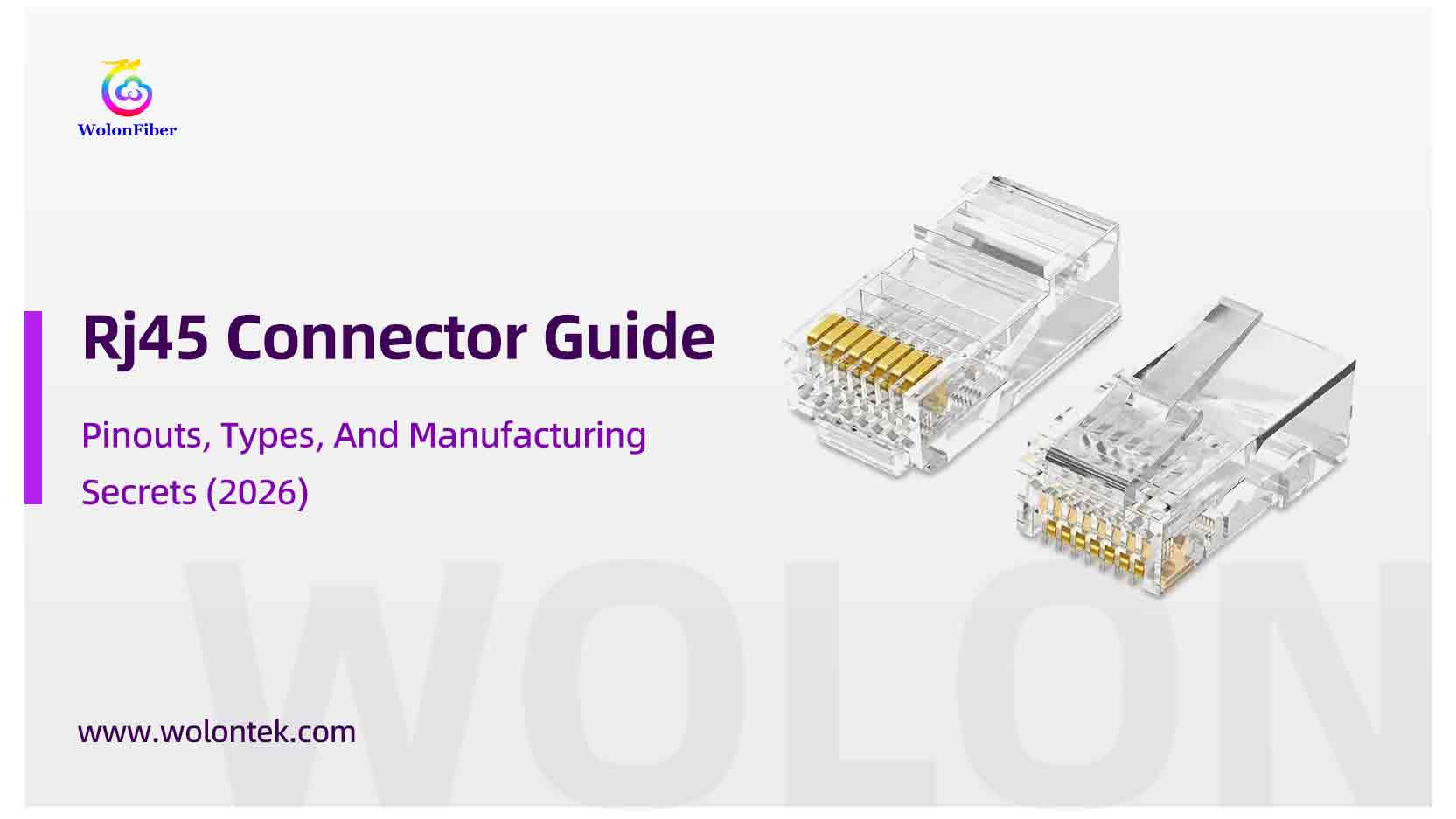
You spent top dollar on 1000 feet of pure copper Cat6 cable. You bought a high-performance switch. You ran the cable through the ceiling, successfully avoiding every electrical conduit.
But when you finally plug it in, the link light flickers amber, or worse—it stays dark.
Before you blame the cable, look at the plastic tip you just crimped on. That tiny piece of plastic is the RJ45 connector. It costs pennies, but if you choose the wrong one or crimp it poorly, it will bring your entire Gigabit network down to its knees.
We see this constantly at the factory: great cable ruined by bad termination.
In this guide, we are going to tear down what is the rj45 connector (literally), explain why gold plating thickness matters more than you think, and give you the definitive diagram for the rj45 pinout so you never wire it backwards again.
What is the RJ45 Connector? (The “8P8C” Truth)
Technically, “RJ45” is a wrong name.
“RJ” stands for Registered Jack, a telephone standard. The true engineering name for the Ethernet plug is 8P8C (8 Position, 8 Contact). But since the whole world calls it an rj45 connector, we will stick with that.
It is the universal interface for data. Unlike the smaller square phone jacks (RJ11) you might remember from the 90s, the RJ45 has 8 pins designed to carry four twisted pairs of wire.
But here is the catch: Not all clear plastic plugs are the same.
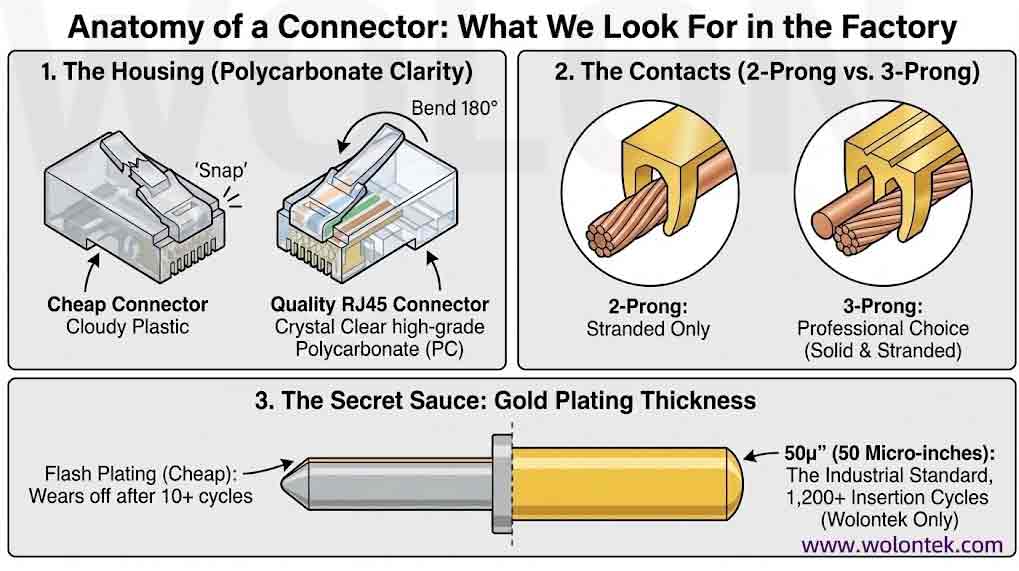
Anatomy of a Connector: What We Look For in the Factory
When we manufacture millions of patch cords at Wolontek, we don’t just grab any plastic plug. We look at three specific specs that determine quality.
1. The Housing (Polycarbonate Clarity)
Bend the latch on a cheap connector. Snap. It breaks. A quality rj45 connector is made of high-grade Polycarbonate (PC). It should be crystal clear (not cloudy) and the latch should be able to bend 180 degrees backwards without snapping. If the latch breaks, the cable falls out of the port. Game over.
2. The Contacts (2-Prong vs. 3-Prong)
Look closely at the gold teeth (pins).
-
2-Prong: Designed for Stranded wire only.
-
3-Prong: The professional choice. It has three teeth that straddle the copper conductor. It works on both Solid and Stranded cables and provides a much tighter, gas-tight grip.
3. The Secret Sauce: Gold Plating Thickness
This is where manufacturers cut costs. The gold plating on the pins prevents rust and ensures conductivity.
-
Flash Plating (Cheap): A microscopic layer that wears off after you plug it in 10 times. Avoid this.
-
50µ” (50 Micro-inches): The industrial standard. It guarantees durability for 1,200+ insertion cycles. Wolontek only uses 50µ” plating.
The Holy Grail: RJ45 Pinout (T568A vs. T568B)
You have 8 colored wires. You have 8 slots. Which order do they go in?
This brings us to the rj45 pinout standards: T568A and T568B, defined by the Telecommunications Industry Association (TIA).
Which One Should You Use?
Unless you are working on a government contract in the USA (which often requires T568A), always use T568B.
-
T568B is the commercial standard.
-
T568B is what most pre-made cables use.
-
T568B is what we recommend for 99% of installations.
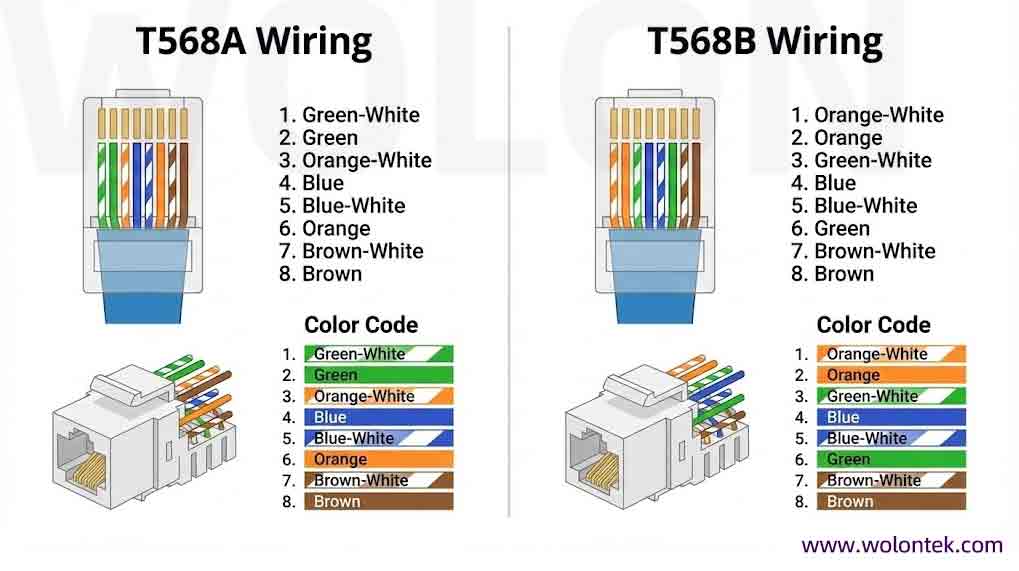
The Wiring Cheat Sheet (Clip and Save This)
Here is the proper color order for T568B, looking at the bottom (flat side) of the connector, clip facing away from you, going Left to Right:
| Pin | Wire Color (T568B Standard) | Signal (10/100 Mode) |
|---|---|---|
| 1 |
Orange / White
|
Tx + (Transmit) |
| 2 |
Orange
|
Tx – (Transmit) |
| 3 |
Green / White
|
Rx + (Receive) |
| 4 |
Blue
|
Unused / PoE DC+ |
| 5 |
Blue / White
|
Unused / PoE DC+ |
| 6 |
Green
|
Rx – (Receive) |
| 7 |
Brown / White
|
Unused / PoE DC- |
| 8 |
Brown
|
Unused / PoE DC- |
Pro Tip: If you wire one end T568A and the other end T568B, you create a “Crossover Cable.” In the old days, you needed this to connect two switches. Modern switches have “Auto-MDIX” chips that fix this automatically, but it’s still bad practice. Stick to T568B on both ends.
Factory Insider: The PoE “Arcing” Risk
Here is a serious safety note.Modern networks use PoE (Power over Ethernet) to power cameras and Wi-Fi points, adhering to IEEE 802.3 standards.
When you unplug a live PoE device, a tiny electrical spark (arc) jumps between the jack and the plug.
-
Cheap Connectors: The contact point erodes instantly, causing carbon buildup. Eventually, the port stops working.
-
Quality Connectors: We design the pin geometry so that the “Arcing Area” is separate from the “Data Contact Area.” Even if it sparks during removal, the data connection remains clean.
Don’t risk your $500 switch port with a $0.05 connector.
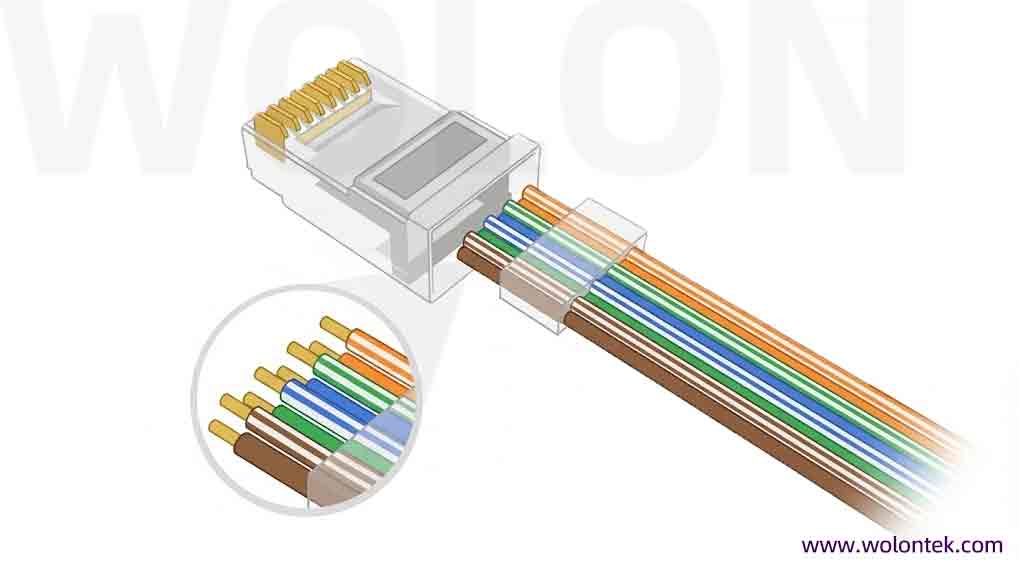
How to Crimp It Right (The 5-Step Logic)
5-Step RJ45 Termination Guide
CRUCIAL: The cable jacket must go into the connector past the crimp wedge. If you see colored wires exposed outside the plug, pull it out and try again.
Need a visual walkthrough? Check our technician’s demo:
Frequently Asked Questions (FAQ)
Q: My Cisco switch says “err-disable: unsupported transceiver”. How do I fix this?
A: This is a common error when using non-Cisco original modules. On most Catalyst switches, you can force the port up by entering configuration mode (conf t) and running two commands:service unsupported-transceiver (an undocumented command on some IOS versions)no errdisable detect cause gbic-invalid Note: High-quality third-party suppliers like Wolon code their EEPROMs to mimic original Cisco attributes, often preventing this error entirely.
Q: What is the difference between DOM and DDM?
A: They are effectively the same thing. DOM (Digital Optical Monitoring) and DDM (Digital Diagnostic Monitoring) both refer to the industry standard (SFF-8472) that allows the switch to read real-time parameters like Tx/Rx optical power, temperature, and voltage from the SFP module.
Q: Why do I see “Rx Power: -40.0 dBm” or “N/A” in the command output?
A: A reading of -40 dBm (or significantly below the sensitivity threshold) usually means no light is being received. This indicates a broken fiber cable, a dirty connector, or the remote transmitter is dead. If it says “N/A,” the SFP module installed may not support DOM features.
Q: Will using a third-party (compatible) SFP void my Cisco SmartNet warranty?
A: Generally, no. In the US, the Magnuson-Moss Warranty Act protects consumers from being forced to use OEM parts. Cisco typically states that if a hardware fault is caused by the third-party part, they won’t cover that specific repair, but they cannot void the warranty for the entire switch just because a non-Cisco SFP is plugged in.
Q: How does Wolon ensure compatibility with my specific Cisco Nexus/Catalyst switch?
A: Compatibility is defined by the data written to the SFP’s EEPROM chip. Wolon maintains a database of coding configurations for thousands of platforms (Cisco, Juniper, Arista, etc.). Before shipping, we program the specific “handshake” codes required by your hardware and verify them in our test lab to ensure plug-and-play functionality.
Q: Can I mix brands? (e.g., Cisco switch on one end, Juniper on the other)?
A: Yes. Ethernet is a standard protocol. As long as the optical specifications match (e.g., both sides are using 10GBASE-LR, 1310nm, Single Mode), the link will work perfectly, even if Side A uses a Cisco module and Side B uses a Wolon module for Juniper.
Final Thoughts
The humble rj45 connector is the smallest part of your infrastructure, but it’s the one we touch the most.
Whether you are building a data center or just wiring your home office, remember: Material matters. Polycarbonate housing, 50µ” gold plating, and the correct T568B pinout are the difference between a network that lasts 10 years and one that fails next Tuesday.

Wolon’s factory-made patch cords use the same professional-grade 50µ Gold Plated Connectors discussed above, but with Machine Injection Molding for superior strain relief and durability.