If you’ve ever stared at the back of a switch and wondered what that tiny slot labeled “SFP” is for, you’re not alone. In plain terms, an SFP port on a gigabit switch is the little plug-in hole that gives the switch physical flexibility — the ability to use fiber one minute and copper the next without buying a different switch. But that simple sentence hides why engineers love them: they let you adapt link type and reach with minimal fuss. Below I’ll explain what an SFP port does, the common module choices, real-world use cases, and practical tips I’ve learned from running networks.

What is SFP Port?
SFP stands for Small Form-factor Pluggable. The port is just the receptacle; the module you insert does the actual work. That module converts the switch’s internal electrical signal to whatever the cable needs — multimode fiber, Single-mode fiber, or even copper via an RJ-45 SFP. Think of the SFP port like a universal socket: plug in the module that matches the job, and the switch speaks the right physical language.
Why engineers put SFP ports on gigabit switches
Flexibility and inventory efficiency. Instead of stocking separate fiber and copper models, vendors ship mainstream gigabit switches with a couple of SFP slots so you only buy optics for the links that need them. For a small network this keeps costs down; for larger deployments it simplifies spare parts and upgrades. In short: you pay for optics only where they’re needed.
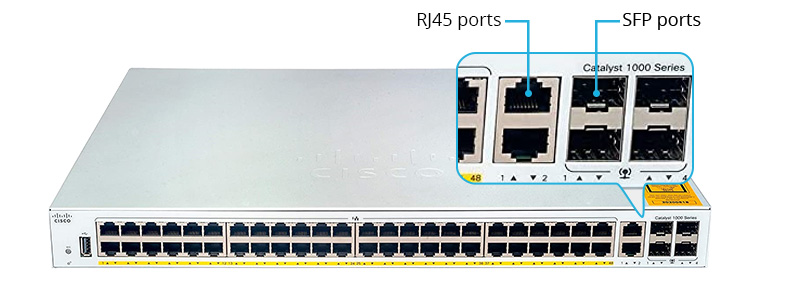
The everyday module types you’ll actually use
Here are the practical SFP options you’ll run into in the field:
• 1000BASE-SX (multimode, short distance) — Common in data centers and buildings for short runs (dozens to a few hundred meters depending on fiber type). Use SX when you’ve got multimode cable and short cross-rack or closet-to-closet links.
• 1000BASE-LX (single-mode, longer runs) — Good for campus links or building-to-building runs, typically up to several kilometers on single-mode fiber.
• 1000BASE-T (RJ-45 copper SFP) — If you suddenly need to connect a copper device but only have an SFP slot free, drop in a 1000BASE-T module and use Cat5e/6 up to ~100 m. Very handy as a stopgap.
• Extended-reach modules (ZX, etc.) — Used for longer metropolitan or long-haul links; check vendor distance specs — these can vary widely.
In practice, pick SX for short multimode, LX for single-mode runs, and use RJ-45 SFP if fiber isn’t available at the far end.
One important distinction: SFP vs SFP+
They look the same but behave differently. SFP is typically 1 Gbps; SFP+ supports 10 Gbps. Some SFP+ slots accept 1 G Sfp Modules and run at 1G, but you can’t put a 10G SFP+ module into a 1G-only SFP slot. Always double-check whether the slot supports dual rates before assuming cross-compatibility.
Real-world use cases
• Uplinks to aggregation switches: Use single-mode LX optics when fiber connects buildings.
• Closet interconnects: Use SX on multimode trunks inside a building — cheaper and simpler.
• Temporary copper ties: If a device only has copper and the switch has an empty SFP, use a 1000BASE-T SFP instead of re-cabling.
• Fast recovery: Keep spare SFPs in a small parts kit (one fiber, one copper) — swapping an SFP is faster than pulling new cable.
Compatibility and the vendor headache
SFPs follow an industry standard in general, but vendors sometimes check module IDs and refuse non-branded optics. I’ve seen managed switches log warnings or disable non-approved optics until a firmware tweak was applied. Always consult the switch vendor’s compatibility list and test third-party optics in a lab before you deploy them in production.
Also, match multimode to multimode and single-mode to single-mode — mixing them won’t work well and often results in link failure or severe attenuation.
A short checklist to choose the right SFP
-
Match the distance: SX for short multimode, LX for longer single-mode, ZX for extended distances.
-
connector type: Most SFPs use LC connectors — confirm your patch panels and pigtails match.
-
Fiber type: Don’t mix MMF with SMF. If you must, plan for media conversion.
-
Wavelength/Tx-Rx pairing: For BiDi or single-fiber modules, you need complementary wavelengths at each end.
-
Vendor compatibility: Check the switch’s approved optics list and run a lab test if possible.
Installation tips I actually follow
• Hot-swap is supported by most enterprise switches, but if the link is carrying production traffic, schedule a brief maintenance window or at least notify affected users.
• Keep dust caps on optics until you’re ready to plug them in. A tiny speck of dust can ruin a link.
• Handle modules by the metal sleeve, not the fiber ferrule.
• Label both ends of the fiber after you terminate — you’ll thank yourself later.
When not to rely on SFPs
If you need native multi-gig performance (2.5/5/10 Gbps) and your switch only supports 1G SFPs, don’t try to bandage it — buy hardware that natively supports the speeds you need. Also, if vendor support requires only OEM optics, weigh the cost of compliance against the operational risk of non-supported modules.
Final takeaway
An SFP port on a gigabit switch is a small, pluggable slot that gives you outsized flexibility: swap optics to change cable type or extend reach without replacing the switch. For short building links use SX multimode modules, for longer runs pick LX single-mode, and keep a copper SFP handy for ad-hoc connections. Match fiber type, check compatibility, and test before you deploy — that simple approach keeps networks predictable and easy to maintain.