
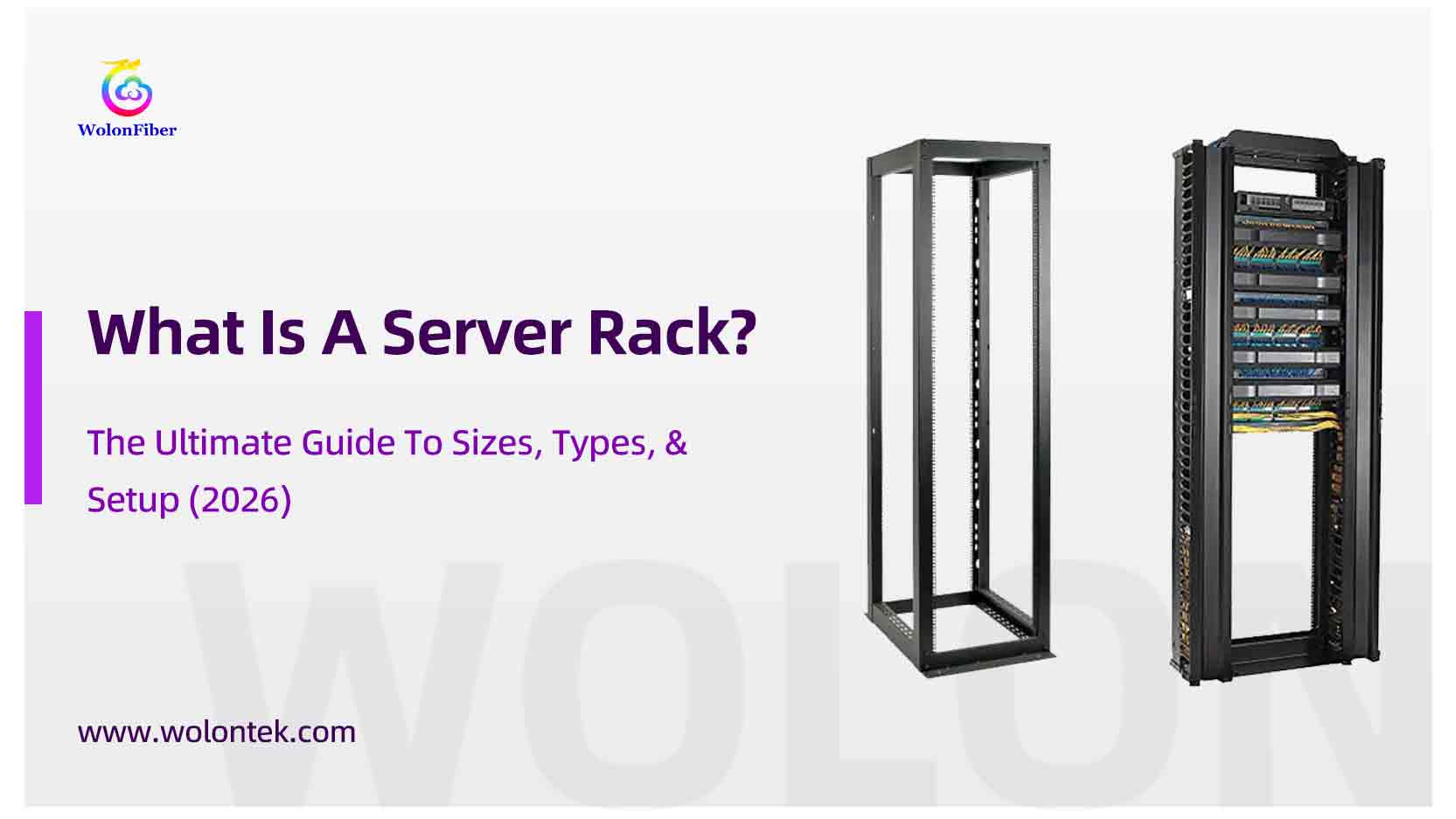
If you deploy a server room, enterprise data center, or small office network, all physical infrastructure builds rely on one core foundation: the server rack.
Selecting an incompatible rack triggers persistent operational issues including insufficient cooling, unmanageable cable clutter, and costly premature hardware upgrades. This guide clarifies server rack structure, standard rack unit (U) measurements, and helps you select between open frame racks, enclosed cabinets, and wall-mount racks for 2026 network infrastructure deployments.
What is a Server Rack?
A Server Rack is a specialized metal frame designed to hold, organize, and secure IT equipment. This includes servers, routers, switches, and patch panels.
Unlike a standard shelf, a server rack is built to a strict industry standard (EIA-310-D). This ensures that a switch bought from Cisco, a server from Dell, and a patch panel from Wolon will all fit perfectly into the same vertical slots.
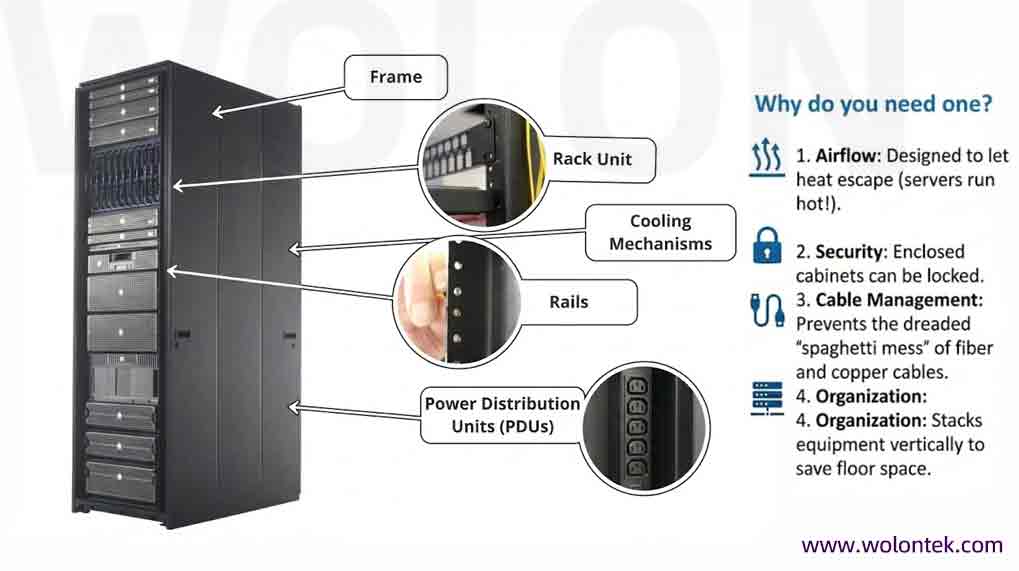
Core Functions of a Server Rack
Space Optimization: Vertical hardware stacking reduces required floor footprint.
Airflow: Structured venting routes waste heat away from heat-generating rack hardware.
Physical Security: Lockable enclosed cabinets prevent unauthorized equipment access.
Cable Management: Eliminates disorganized fiber and copper cable tangles.
Understanding Rack Units (U)
All rack capacity is measured using rack units (U), the industry standard for vertical mounting height.
1U = 1.75 inches / 44.45 mm
- Standard network switches and single-port patch panels occupy 1U of rack space
- High-density rackmount servers typically require 2U or 4U vertical space
Standard Rack Height Sizes
- 42U Full-Size Rack (Data Center Standard)Stands approximately 7 feet tall, designed for large-scale deployment of dozens of servers and network gear; the most widely deployed cabinet in colocation and hyperscale data centers.
- 24U Half RackSuitable for mid-sized small businesses that do not require full ceiling-height rack infrastructure.
- 6U – 12U Wall-Mount RackCompact form factor for branch office edge deployments, built only to house basic routers and access switches.
Pro Sourcing Tip
Always specify a rack with 20%–30% extra U capacity beyond your current hardware footprint. Reserved vertical space accommodates future equipment additions and dedicated cable management routing.
The 3 Main Types of Server Racks
Critical Rack Dimensions: Width & Depth
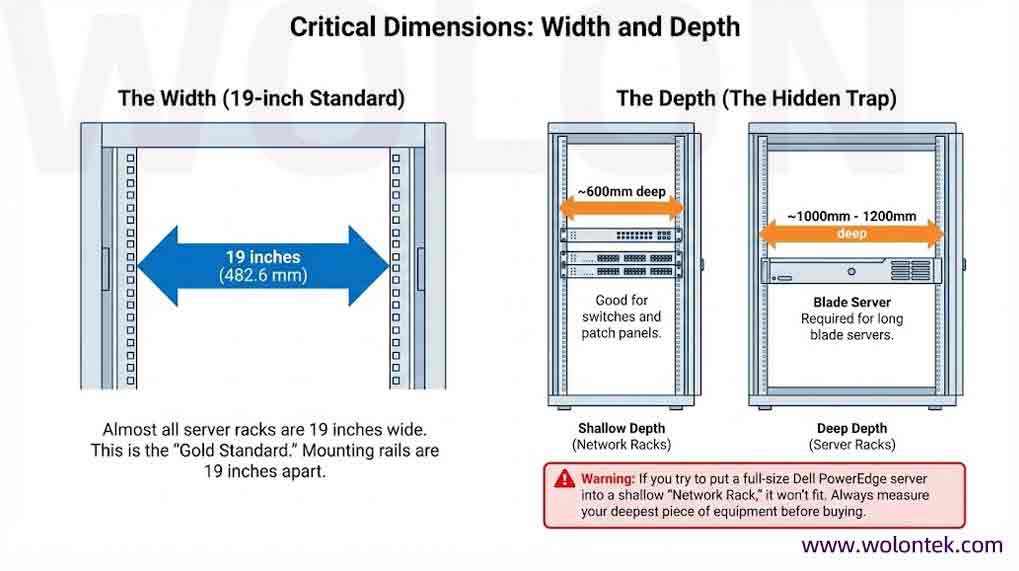
Standard 19-Inch Mounting Width
The 19-inch (482.6 mm) internal rail spacing is the universal industry mounting specification. All standard rackmount hardware from Wolon and major global OEMs align with this dimension for full interchangeability.
Cabinet Depth: Common Sizing Pitfall
Rack depth varies drastically and is a frequent specification oversight during procurement:
Deep server racks (1000mm – 1200mm depth): Mandatory for full-size blade and rackmount servers
Shallow network racks (~600mm depth): Designed exclusively for switches and compact patch panels
⚠️ Warning: Full-depth Dell PowerEdge rack servers cannot be installed inside shallow network racks. Always measure the maximum depth of your existing or planned hardware before finalizing rack purchases.
Essential Rack Accessories for Full Functionality
A bare metal rack frame requires supporting hardware for stable, compliant long-term operation:
Blanking PanelsSolid plastic filler plates for unused rack U slots, which optimize cabinet airflow efficiency and stabilize cold/hot aisle temperature separation.
PDUs (Power Distribution Units)Industrial-grade power strips available in vertical Zero U and horizontal rack-mount formats to deliver consistent power to all rack devices. Zero U PDUs mount to rear rack rails without consuming vertical U space.
Horizontal & Vertical Cable ManagersRouted plastic guides for organized routing of Cat6 copper cabling and high-density fiber trunk cables, reducing airflow blockages and simplifying future maintenance.
Fiber & Copper Patch PanelsCentral termination points for building horizontal and backbone cabling infrastructure. View our dedicated technical guide: Fiber Connector Types
Step-by-Step Server Rack Setup & Deployment Guide (2026 Standard)
This section fulfills the “Setup” requirement from the article title, covering standardized on-site installation workflows:
- Pre-Deployment Site Validation
- Confirm floor load rating for full-size 42U cabinets; wall-mount racks require reinforced stud wall anchoring.
- Map room HVAC airflow to align cabinet front intake vents with cold aisle supply air.
- Cabinet Placement & Anchoring
- Full-height floor racks: Secure anti-tip stabilizer feet and floor anchor brackets to prevent tipping during hardware sliding.
- Wall-mount racks: Use heavy-duty lag bolts rated for the cabinet’s maximum load capacity; maintain minimum 6-inch rear clearance for ventilation.
- Hardware Mounting SequenceInstall heaviest devices (UPS, rack servers) at the lowest rack U positions to lower center of gravity; mount lightweight switches and patch panels in upper rack slots.
- Cable Routing & Thermal OptimizationRoute all fiber and copper cables through dedicated vertical/horizontal managers; install blanking panels on empty slots to eliminate unregulated air bypass.
- Final Security & Performance CheckLock enclosed cabinet doors, test all PDU power outlets, and verify cabinet intake/exhaust fan operation before live network cutover.
Conclusion: Build Reliable Network Infrastructure From the Ground Up
Whether you deploy a large 42U data center rack cluster or a compact 6U wall cabinet for a small retail site, the server rack forms the physical backbone of every wired network.
Rack Procurement Checklist
Validate site load capacity and HVAC cooling performance for full cabinet deployments
Calculate total required U capacity, plus 20–30% reserved space for future expansion
Confirm cabinet depth matches the maximum depth of your rackmount servers or switches
Evaluate security requirements to choose between lockable enclosed cabinets or low-cost open frame racks
A Rack is Just the Skeleton. We Provide the Nervous System.
Don’t source your Enclosures from one vendor and your Cable Managers from another.
At Wolon, we provide the Entire Passive Infrastructure: from Horizontal Cable Managers to Fiber Patch Panels. Guaranteed fit, one shipment.
Includes: Cable Managers, Blank Panels, Fiber Enclosures & PDUs.
FAQ: Server Racks 101
Q1: What is the difference between a 2-post and 4-post rack?
A: A 2-post rack (Relay Rack) is generally used for lightweight equipment like routers, switches, and patch panels. A 4-post rack provides support at all four corners, making it necessary for heavy servers that need to slide out on rails.
Q2: Can I put a server rack in a normal office room?
A: You can, but be careful. Servers are loud and generate heat. If you must place a rack in a workspace, choose a Soundproof Enclosed Cabinet with built-in quiet fans.
Q3: How do I calculate how many “U” I need?
A: Add up the height of all your devices (e.g., Switch (1U) + Server (2U) + UPS (2U) = 5U). Then, add at least 20-30% extra space for future growth and cable management.
Q4: What is a “Zero U” PDU?
A: A “Zero U” PDU is a long power strip that mounts vertically on the back rails of the rack. It provides power outlets without taking up any of the valuable horizontal “U” space meant for servers.
Q5:What weight limits apply to wall-mount server racks?
Compact 6U–12U wall cabinets have strict load ratings, typically under 80kg. Never install full-depth rack servers inside wall-mount hardware; reserve these cabinets only for lightweight switches and patch panels.
Q6:How to optimize cooling inside an enclosed server cabinet?
Maintain unobstructed front cold air intake and rear hot exhaust pathways. Install blanking panels on all empty rack slots, avoid overpacking cable managers, and match cabinet fan speed to total rack power draw.