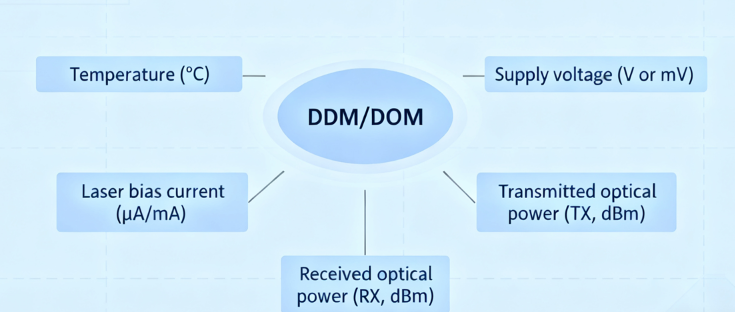
Digital Diagnostic Monitoring (DDM), also called Digital Optical Monitoring (DOM), is one of those small features that saves hours in the field. Built into modern SFP/SFP+/SFP28/QSFP family modules and standardized by SFF-8472, DDM/DOM exposes real-time values for the module’s temperature, supply voltage, laser bias current, transmit power and receive power. Read correctly, those five numbers let you separate transceiver failures from cabling faults, bad connectors, or simply a marginal link budget — and they give you measurable evidence to take to vendors or cut replacement cycles.
Below is a practical, engineer-friendly guide to what each DDM/DOM reading means, how to interpret out-of-range values, a step-by-step troubleshooting flow, and how to avoid common misreads.

The five core DDM/DOM parameters — what they tell you
-
Temperature (°C): Indicates the module’s internal temperature. Large deviations from expected operating range suggest cooling or power problems, and sustained over-temperature can shorten laser life. Use vendor datasheets for the allowed operating window.
-
Supply voltage (V or mV): Shows the module’s internal supply rail (typically near 3.3 V). A sagging voltage or noisy rail can cause intermittent behavior or invalid EEPROM reads.
-
Laser bias current (µA/mA): Bias current is the DC current driving the laser diode. A sudden increase at constant TX power suggests an aging or failing laser; a very low bias can indicate a dead/damaged laser. Interpreting bias current requires the vendor’s expected range for that module type.
-
Transmitted optical power (TX, dBm): The power the module emits. Low TX often points to a failing laser or dirty connector; excessively high TX (rare) can indicate calibration errors. Compare the measured TX against the module’s specified TX min/max and your link-budget plan.
-
Received optical power (RX, dBm): The optical power arriving at the receiver. RX near or below the module’s sensitivity limit explains link drops or high error rates. A healthy RX that’s much lower than expected usually indicates fiber loss, dirty connectors, or wrong fiber type (MMF vs SMF).
Typical units and quick reference ranges
DDM values are reported in common units: temperature in °C, voltage in mV or V, bias in µA or mA, and optical power in dBm. Typical TX/RX windows vary enormously by media (10G SR vs 10G LR vs DWDM), so always check the module datasheet. For example, short-reach multimode 10G SR optics often show TX around –7 dBm to 0 dBm and receiver sensitivity around –11 dBm or lower, while LR single-mode parts have different ranges. Never rely on a single “rule of thumb” for absolute limits — use the vendor spec plus your link budget.
How to use DDM/DOM readings in troubleshooting (practical flow)
-
Capture the readings from both ends. Always query the transceiver on each side of the link and log the values. Most switches expose DDM via CLI commands such as show interfaces transceiver / show interface transceiver diagnostics (Cisco, Juniper, many others) or via controller GUIs. Comparing both ends immediately separates source vs path problems.
-
Clean and reseat before deep diagnosis. The number-one fix in fiber world is cleaning connectors. A dirty LC or MPO will depress RX without changing the TX at the far end; cleaning and reseating can change readings dramatically. Don’t skip this.
-
Compare TX of A to RX of B (and vice versa). TX(A) should approximately match RX(B) minus link loss. If TX looks normal but RX is low, suspect attenuation (dirty/poor connector, wrong fiber type, bend) or a break. If both TX and RX are low, suspect the transmitting module.
-
Watch bias current trends. If TX drops while bias current climbs, the laser may be failing. If bias is zero or near zero, the laser may not be driven at all. Use vendor expected bias values when diagnosing.
-
Voltage and temperature checks for platform issues. If multiple modules on one chassis show low voltage or elevated temperatures, the problem can be chassis-level (power supply, fan, PCB). Don’t assume every failed module is a bad SFP.
-
Use DDM history or polling for intermittent faults. Some monitoring platforms poll DOM continuously and raise alerts when values cross thresholds. For brief or thermal-related failures, a single CLI snapshot can miss the problem — continuous sampling captures it.
Common failure patterns and what DDM shows
-
Dirty connector: Normal TX, low RX at the receiver end. Fix: clean end faces, re-measure.
-
Bad laser / failing module: Low TX, abnormal bias trends (high bias with low TX). Fix: replace module, test spare.
-
Excessive attenuation / wrong fiber: TX and RX at opposite ends don’t reconcile with expected link loss; RX below sensitivity. Fix: verify fiber type, measure with OTDR if needed.
-
Board/chassis power or thermal issues: Multiple modules report low voltage or high temp. Fix: check fans, PSUs, ambient cooling.
How to read DDM/DOM on gear (quick examples)
-
Cisco: show interfaces Transceiver or show interface ethernet x/yy transceiver provides the DDM table. Some platforms require enabling DOM monitoring via config.
-
Other vendors: Juniper, Arista, Meraki and others expose similar commands or dashboards; check vendor docs for exact syntax. Many vendor KBs include step-by-step examples. Poll both ends whenever possible.
Limitations and gotchas
-
Not all modules support DOM: Some legacy or low-cost optics omit DDM. If no data is returned, that may be the reason, not a broken interface.
-
Calibration differences: Module families use different internal calibration; two modules of different makes can report slightly different absolute values while both are technically healthy. Use trends and relative comparisons alongside specs.
-
Unit mismatches and scaling: Some CLI outputs report mV or µA; others show base units — read headings carefully.
Practical tips for operations
-
Build DDM checks into nightly monitoring and alert if TX/RX drift beyond configured thresholds.
-
Archive DDM readings to detect slow degradation (laser aging) before outright failure.
-
Keep vendor datasheets and the SFF-8472 mapping at hand when interpreting values — the SFF standard defines the memory map and expected parameters.
WOLON product note

WOLON’s transceiver family includes modules with full DDM/DOM support, clear datasheets listing TX/RX windows and bias expectations, and a vendor compatibility table to simplify diagnosis. Each WOLON module ships with pre-test DDM reports so installers can baseline values before deployment — reducing field troubleshooting and swap cycles.